
Add Bank Account at LUCKYTOWN PLUS - Complete Guide
Why Add a Bank Account at LUCKYTOWN PLUS?

Before you can make any withdrawal from your LUCKYTOWN PLUS account, you are required to register a personal bank account in the app. This is a one-time setup process that links your gaming account to your personal Malaysian bank account, ensuring that all withdrawal funds are transferred directly and securely to your own bank.
LUCKYTOWN PLUS enforces a strict policy that all withdrawals must be made to a bank account that matches the name of the registered deposit account holder. This measure is in place to protect customers from fraud and to ensure that funds are only ever sent to the verified account owner. Without a registered bank account, withdrawal requests cannot be processed.
LUCKYTOWN PLUS Add Bank Account - Full 7-Step Setup Guide for LUCKYTOWN Members




Step 1: Open the App and Tap Me
Launch the LUCKYTOWN PLUS app on your mobile device. On the main home page, you will see the bottom navigation bar containing four icons: Home, Contacts, Promotion, and Me. Tap on the Me icon located at the bottom right corner of the screen to access your personal account dashboard.
Step 2: Select Bank Account
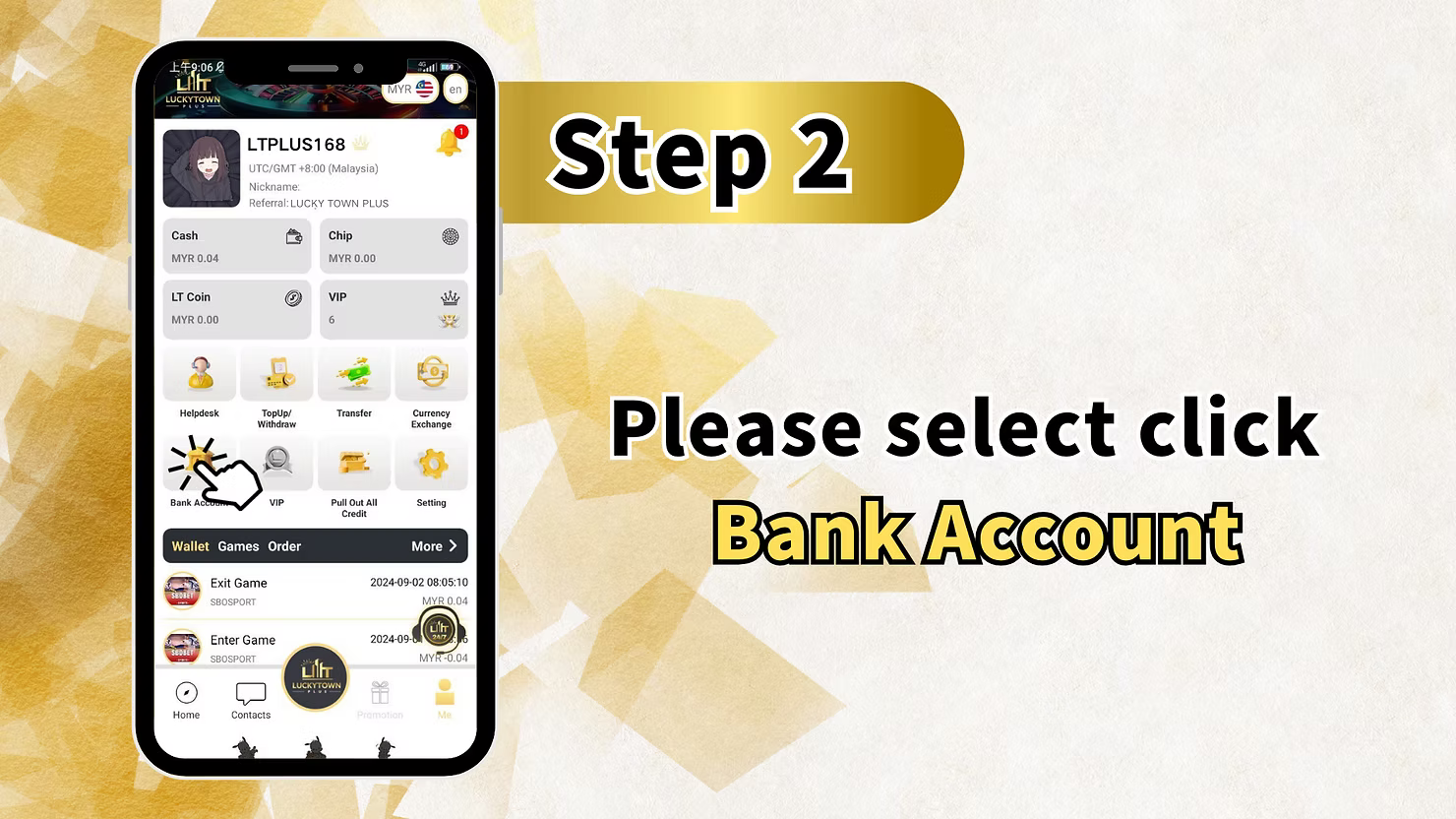
Once you are on your personal account page, you will see your full account summary including your Cash balance, Chip balance, LT Coin balance, and VIP level. Below your balance overview, there is a row of quick action icons including Helpdesk, Top Up / Withdraw, Transfer, Currency Exchange, Bank Account, VIP, Pull Out All Credit, and Setting. Tap on the Bank Account icon to proceed to the bank account management page.
Step 3: Tap Add Bank Account
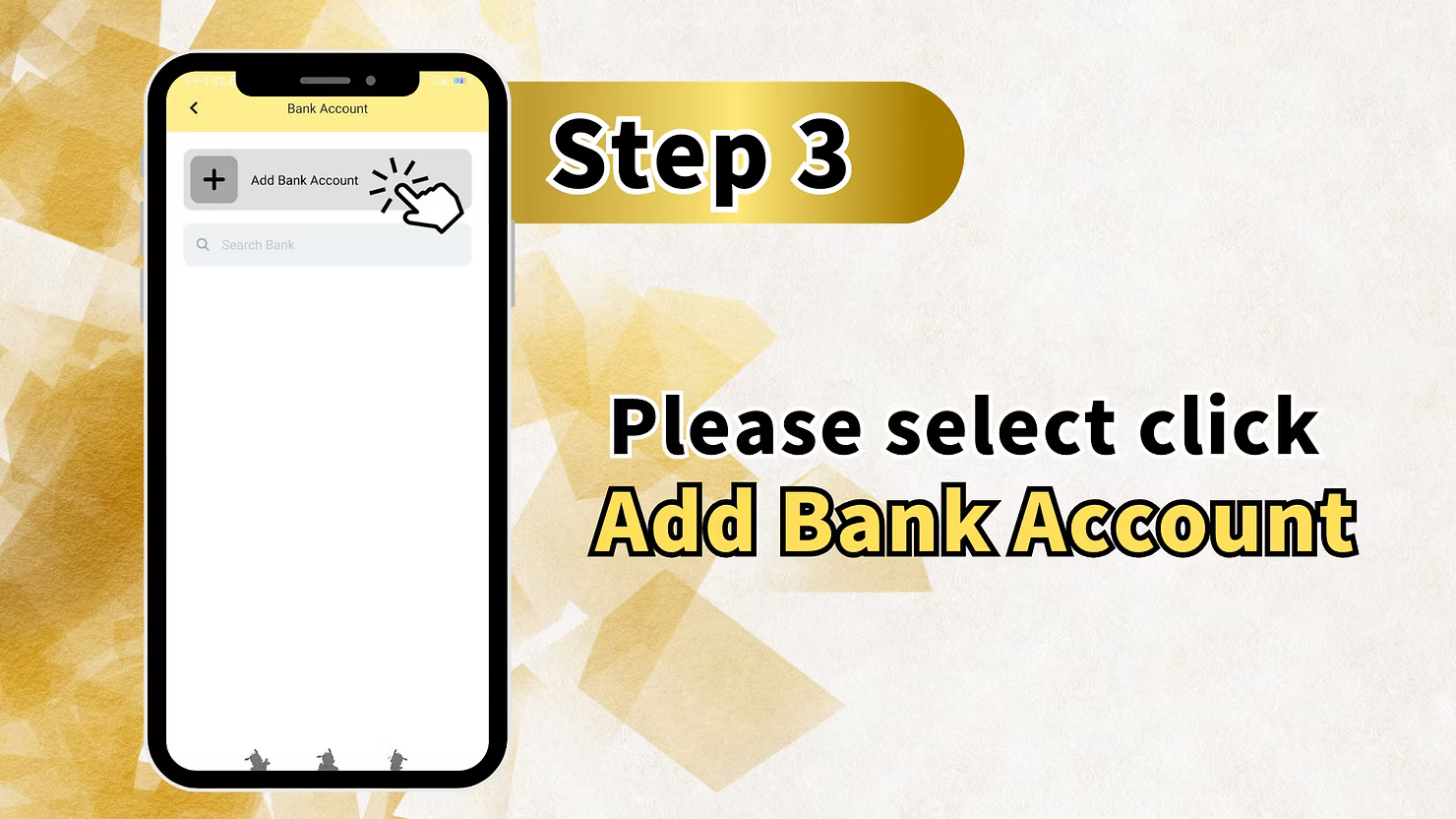
On the Bank Account page, you will see the option to Add Bank Account with a plus icon at the top of the screen. There is also a Search Bank field available if you have already added accounts and wish to search for a specific bank. Since you are adding a bank account for the first time, tap on the Add Bank Account button to begin the registration process.
Step 4: Select Your Bank and Enter Account Name
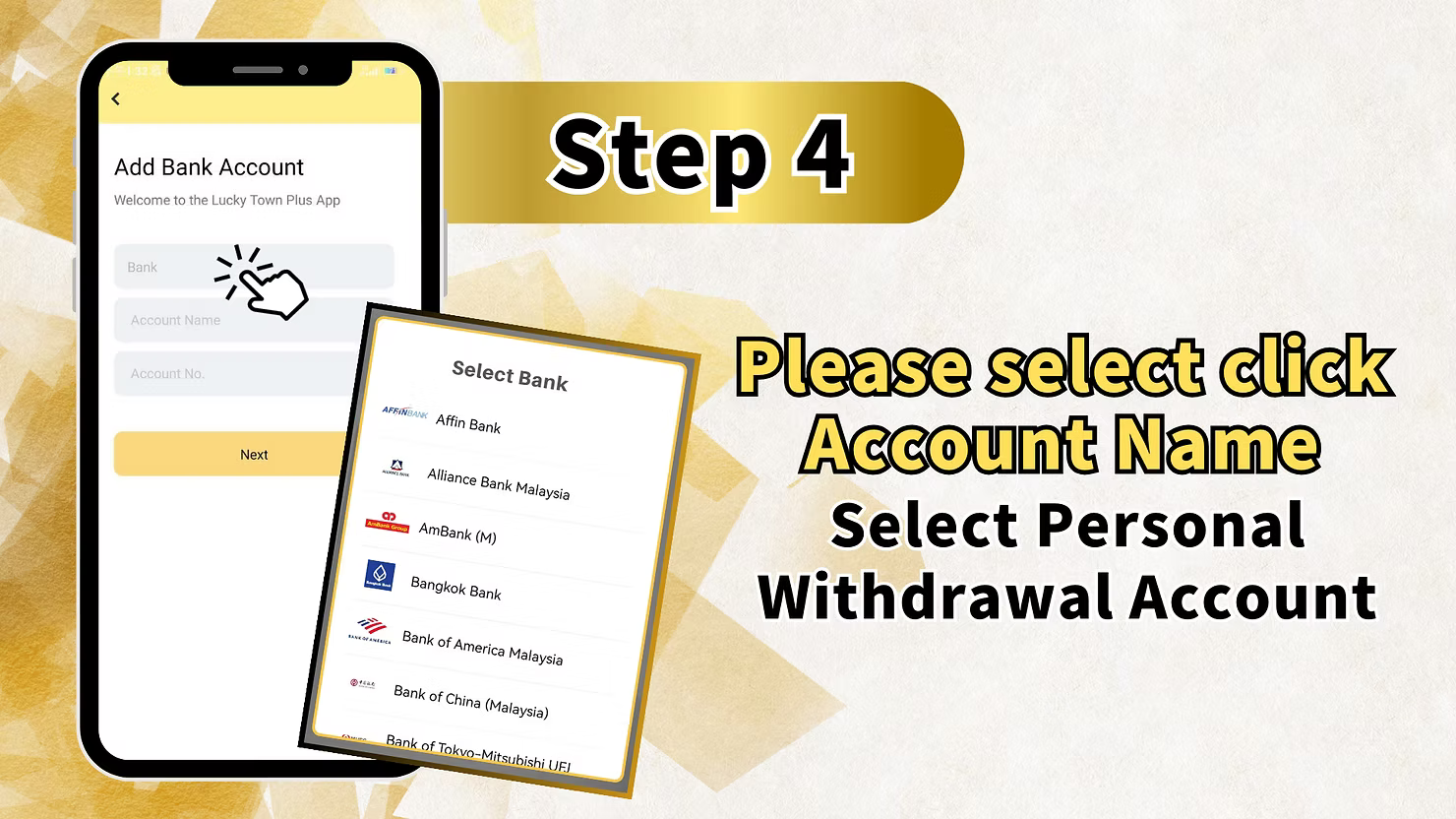
After tapping Add Bank Account, you will be taken to the Add Bank Account form page which displays a welcome message from the Lucky Town Plus App. The form contains three fields: Bank, Account Name, and Account No. Tap on the Bank field to open the Select Bank dropdown list.
The Select Bank list includes all major Malaysian banks supported by LUCKYTOWN PLUS such as Affin Bank, Alliance Bank Malaysia, AmBank M, Bangkok Bank, Bank of America Malaysia, Bank of China Malaysia, Bank of Tokyo-Mitsubishi UFJ, and many more. Scroll through the list or use the search function to find your bank. Tap on your bank name to select it. Next, fill in the Account Name field with your personal name exactly as it appears on your bank account. This name must match the account holder name on your bank records.
Step 5: Enter Your Bank Account Number and Click Next
After selecting your bank and entering your account name, fill in the Account No. field with your full bank account number. Double-check that the account number you have entered is correct before proceeding, as an incorrect account number may result in failed withdrawals. Once all three fields are filled in correctly showing your bank name, account name, and account number, tap the Next button to proceed to the security verification step.
Step 6: Enter Your Transaction PIN
For security purposes, LUCKYTOWN PLUS requires you to verify your identity with a 6-digit Transaction PIN before the bank account can be added. On the Transaction PIN screen, you will see a numeric keypad from 0 to 9. Enter your 6-digit trading password that you set during your account registration process to confirm the bank account addition.
If you have forgotten your transaction PIN, tap on the Forgot Transaction Pin link on the screen to initiate the PIN recovery process. Your transaction PIN is a 6-digit password that is separate from your login password and was set when you first registered your LUCKYTOWN PLUS account. Always keep your transaction PIN confidential to protect your account security.
Step 7: Bank Account Addition Completed
Once your transaction PIN has been verified successfully, your bank account will be added and displayed on the Bank Account page. You will be able to see your registered bank account listed with your account name, bank name, and masked account number for security. In the example shown, the account is displayed as Lucky Town Plus under AmBank M with the last four digits of the account number visible as 7978.
Your bank account is now fully set up and linked to your LUCKYTOWN PLUS profile. You may now proceed to make withdrawal requests, and all funds will be transferred to your registered bank account. Please note that for the safety of all customers, LUCKYTOWN PLUS strictly processes withdrawals only to the bank account that matches the name of the registered deposit account holder. This policy is enforced to prevent fraud and protect your funds at all times.
Important Rules for Adding a Bank Account on LUCKYTOWN PLUS
Bank Account Name Must Match Your Trading Account Name
One of the most important requirements when adding a bank account on LUCKYTOWN PLUS is that the Account Name you register must match the name associated with your LUCKYTOWN PLUS trading account. This name verification step is a mandatory security measure. If the names do not match, your withdrawal requests may be rejected or delayed. Always use your full legal name as per your identification card when registering your bank account.
Why Withdrawals Must Match the Deposit Account Name
LUCKYTOWN PLUS has a strict policy that all withdrawals must be processed to a bank account that corresponds to the name of the person who made the deposit. This rule exists to protect customers from fraud, money laundering risks, and unauthorized transactions. By ensuring the deposit and withdrawal names are the same, LUCKYTOWN PLUS guarantees that your funds are always returned safely to you and no third party can intercept or redirect your withdrawal.
Supported Malaysian Banks
LUCKYTOWN PLUS supports a comprehensive list of Malaysian banks for withdrawal registration. The supported banks include Affin Bank, Alliance Bank Malaysia, AmBank M, Bangkok Bank, Bank of America Malaysia, Bank of China Malaysia, Bank of Tokyo-Mitsubishi UFJ, CIMB Bank, Hong Leong Bank, Maybank, Public Bank, RHB Bank, and many more. If you cannot find your bank in the list, you may use the Search Bank function on the bank selection screen to locate it quickly.
Transaction PIN Security
Your 6-digit transaction PIN is a critical piece of security information that protects your LUCKYTOWN PLUS account from unauthorized changes. This PIN is set during the account registration process and is required whenever you perform sensitive account actions such as adding a bank account or processing a withdrawal. Never share your transaction PIN with anyone. If you have forgotten your transaction PIN, use the Forgot Transaction Pin option available on the PIN entry screen to reset it safely.
Frequently Asked Questions About Adding a Bank Account
Can I add more than one bank account to my LUCKYTOWN PLUS account
Yes, LUCKYTOWN PLUS allows you to add multiple bank accounts to your profile. To add an additional bank account, simply go back to the Bank Account page and tap the Add Bank Account button again. Follow the same steps to enter your bank name, account name, and account number, then verify with your transaction PIN. All added bank accounts will be listed on the Bank Account page for easy management.
What should I do if I entered the wrong bank account number
If you have entered an incorrect bank account number during the setup process, please contact the LUCKYTOWN PLUS customer service team immediately via the in-app Contacts section or live chat. Provide your registered account details and the correct bank account information so that the support team can assist you in updating or removing the incorrect entry. Withdrawals made to an incorrect bank account number cannot be reversed, so always double-check your account number before confirming.
What happens if my bank account name does not match my trading account name
If the bank account name you register does not match your LUCKYTOWN PLUS trading account name, your withdrawal request will be rejected by the system. This is a strict security requirement enforced by LUCKYTOWN PLUS to prevent fraud and protect all users. Please ensure that the name you enter in the Account Name field is exactly the same as the name on your LUCKYTOWN PLUS trading account. If you are unsure about your registered trading account name, contact customer support for verification.
I forgot my transaction PIN. What should I do
If you have forgotten your 6-digit transaction PIN, tap on the Forgot Transaction Pin link that appears below the PIN entry field on the Add Bank Account screen. Follow the on-screen instructions to reset your PIN securely. If you encounter any difficulties during the reset process, reach out to the LUCKYTOWN PLUS support team through the Contacts section in the app for immediate assistance.
Need Help Adding Your Bank Account
If you experience any issues while trying to add your bank account on LUCKYTOWN PLUS, our customer support team is available around the clock to assist you. Simply tap on the Contacts icon in the bottom navigation bar of the app to reach our live support team who will guide you through the process.
Add Your Bank Account on LUCKYTOWN PLUS and Start Withdrawing Today
Setting up your bank account on LUCKYTOWN PLUS is quick, simple, and secure. Follow our 7-step guide to register your personal Malaysian bank account and enjoy fast, hassle-free withdrawals directly to your bank. Your funds are always protected with our strict name-matching verification policy.
Add Bank Account Now