
USDT Top Up at LUCKYTOWN PLUS - Your Crypto Gateway
Why USDT is a Smart Choice for Your LUCKYTOWN PLUS Account
LUCKYTOWN PLUS offers a secure and modern cryptocurrency deposit method through USDT Topup. USDT, also known as Tether, is a stablecoin pegged to the US Dollar and is widely used for fast and borderless digital transactions. By using USDT TRC20 to top up your account, you can enjoy near-instant deposits without the need for traditional bank transfers.
The USDT Topup method on LUCKYTOWN PLUS supports multiple crypto exchange platforms including Binance, Huobi, and other third-party platforms. The current conversion rate is 4.32 MYR per USDT, and all deposits are processed by the financial department within 10 minutes after submission.
LUCKYTOWN PLUS USDT Topup - Full 6-Step Deposit Walkthrough

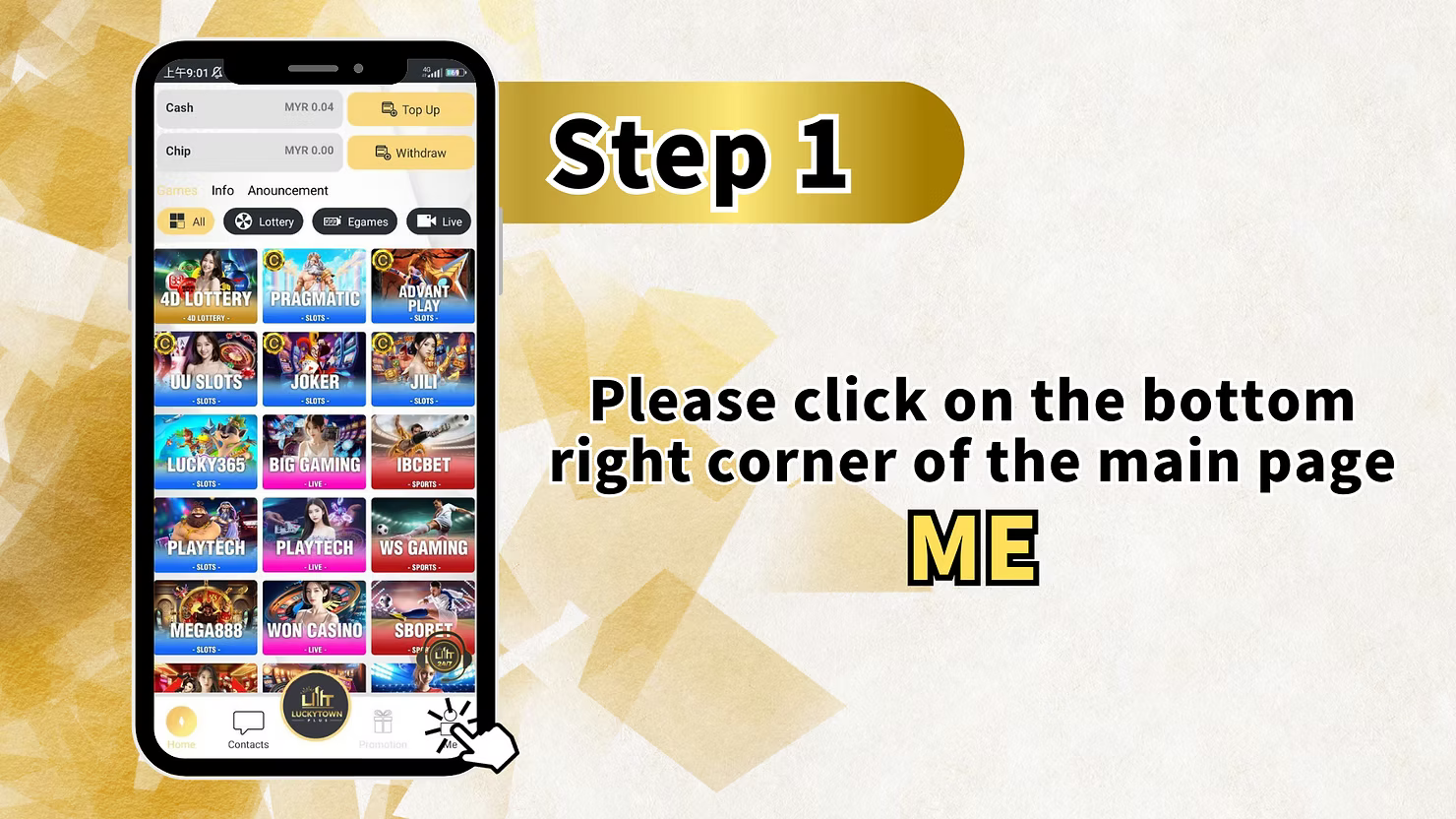


Step 1: Open the App and Tap Me
Launch the LUCKYTOWN PLUS app on your mobile device. Once you are on the main home page, look at the bottom navigation bar which contains icons for Home, Contacts, Promotion, and Me. Tap on the Me icon located at the bottom right corner of the screen to navigate to your personal account dashboard.
Step 2: Select Deposit / Withdrawal
After entering your personal account page, you will be able to view your full account summary including your Cash balance, Chip balance, LT Coin, and VIP level. Below your balance overview, you will find a row of quick action icons including Helpdesk, Top Up / Withdraw, Transfer, Currency Exchange, Bank Account, VIP, Pull Out All Credit, and Setting. Tap on the Top Up / Withdraw icon to access the deposit and withdrawal options.
Step 3: Select the USDT Top Up Tab
On the Top Up / Withdraw page, ensure you are on the Top Up tab. You will see multiple deposit method tabs displayed at the top of the screen including Bank Transfer, Touch N Go, Duit Now, and a USDT or crypto tab. Swipe right on the tab row and tap on the USDT tab to switch to the cryptocurrency deposit section.
Once you are on the USDT deposit page, you will see the Select Deposit Method section with three platform options: Binance, Huobi, and Others. Select the platform that you use to hold your USDT. The page will also display the USDT TRC20 network and the current conversion rate of 4.32 MYR per USDT for your reference.
Step 4: Enter USDT Amount and Choose Your Platform
In the Amount field labeled Amount USDT, enter the amount of USDT you wish to deposit into your LUCKYTOWN PLUS account. Once you enter the USDT amount, the system will automatically calculate and display the equivalent Deposit Amount in MYR based on the current conversion rate of 4.32.
Under the Select Deposit Method section, choose your preferred platform by tapping on Binance, Huobi, or Others depending on which crypto exchange you are using to send the USDT. After filling in the amount and selecting your platform, tap the Next button to proceed to the payment receipt page.
Step 5: Scan the QR Code and Enter Your TXID
After tapping Next, the Topup USDT Receipt page will be displayed. This page contains a QR code linked to the LUCKYTOWN PLUS USDT wallet address. Open your preferred crypto exchange app such as Binance or Huobi, navigate to the withdrawal or send section, and scan the QR code to initiate the USDT transfer to the displayed wallet address.
Once your USDT transfer is completed on your crypto platform, you will receive a Transaction ID also known as TXID. Copy this TXID from your crypto exchange app and paste it into the TXID field on the Topup USDT Receipt page in the LUCKYTOWN PLUS app. This step is mandatory for the financial team to verify and match your transaction. The receipt page will also display important details including the wallet address under Butiran, the Amount in MYR, the Amount in USDT, the conversion Rate, the Address network as USDT TRC20, and the Date and Time of the transaction. After entering your TXID, tap the Confirm button to submit your deposit request.
Step 6: Deposit Request Submitted - Await Processing
After tapping Confirm, the system will display a confirmation popup with a green checkmark and the message Request Top Up Success. This means your USDT deposit request has been successfully submitted to the LUCKYTOWN PLUS financial department. Tap the Got It button to dismiss the popup.
Your deposit will be reviewed and processed by the financial department within 10 minutes. Once approved, the corresponding MYR amount will be credited to your LUCKYTOWN PLUS account balance. If your account has not been credited after 10 minutes, please contact the LUCKYTOWN PLUS customer service team via the in-app Contacts section for immediate assistance.
Important Information About USDT TRC20 Deposits
Why Use TRC20 Network for USDT Deposits
LUCKYTOWN PLUS only accepts USDT deposits via the TRC20 network. The TRC20 network is built on the TRON blockchain and is widely known for its fast transaction speeds and low transfer fees compared to other networks such as ERC20. Always make sure you select TRC20 as your withdrawal network in Binance, Huobi, or any other platform before sending USDT to avoid losing your funds.
What is a TXID and Why Do You Need It
A TXID, short for Transaction ID, is a unique alphanumeric string that is generated every time a blockchain transaction is completed. It serves as proof of your transfer and allows the LUCKYTOWN PLUS financial team to locate and verify your deposit on the blockchain. Without a valid TXID, your deposit cannot be processed. Always copy your TXID immediately after completing the USDT transfer on your exchange platform and submit it promptly in the LUCKYTOWN PLUS app.
Supported Crypto Exchange Platforms
LUCKYTOWN PLUS currently supports USDT deposits from three main sources: Binance, Huobi, and Others. If you are using a different exchange or wallet platform such as OKX, Trust Wallet, or Crypto.com, you can select the Others option during the deposit process. Ensure that whichever platform you use supports USDT TRC20 withdrawals before initiating the transfer.
USDT to MYR Conversion Rate
The current USDT to MYR conversion rate applied for LUCKYTOWN PLUS deposits is 4.32. This means for every 1 USDT you deposit, you will receive MYR 4.32 credited to your LUCKYTOWN PLUS account. As an example, depositing 1000 USDT will result in MYR 4,320 being added to your balance. Please note that conversion rates may be subject to change and the rate displayed in the app at the time of your transaction will be the final applied rate.
Why Choose USDT Topup on LUCKYTOWN PLUS
Fast and Borderless Crypto Deposits
USDT Topup is one of the most efficient deposit methods available on LUCKYTOWN PLUS. Unlike traditional bank transfers that may take hours to process, USDT TRC20 transactions on the TRON blockchain are typically confirmed within minutes. This allows you to fund your gaming account quickly and get back to enjoying your favourite games without unnecessary delays.
Secure and Transparent Transactions
Every USDT deposit made on LUCKYTOWN PLUS is recorded on the blockchain and can be independently verified using the TXID. This ensures full transparency and security for every transaction. The financial department at LUCKYTOWN PLUS processes all USDT deposit requests within 10 minutes to ensure a smooth and reliable top-up experience for all players.
Multiple Platform Support
Whether you use Binance, Huobi, or any other cryptocurrency exchange, LUCKYTOWN PLUS makes it easy to deposit USDT from your preferred platform. The flexible platform selection during the deposit process ensures that players from all backgrounds can conveniently top up their accounts regardless of which crypto exchange they use.
Frequently Asked Questions About USDT Topup
Which network should I use to send USDT
You must use the TRC20 network when sending USDT to LUCKYTOWN PLUS. Sending via any other network such as ERC20 or BEP20 may result in the funds not being received. Always double-check that TRC20 is selected as the withdrawal network in your crypto exchange app before confirming the transfer.
How long does it take for my USDT deposit to be credited
Once you have submitted your TXID and confirmed your deposit request in the LUCKYTOWN PLUS app, the financial department will process your deposit within 10 minutes. If your account balance has not been updated after 10 minutes, please reach out to the LUCKYTOWN PLUS customer service team through the Contacts section in the app for prompt assistance.
What should I do if I sent USDT but forgot to submit the TXID
If you completed the USDT transfer from your exchange but did not submit the TXID in the LUCKYTOWN PLUS app, you will need to go back to the Topup USDT Receipt page and enter your TXID manually before tapping Confirm. If you are unable to locate the receipt page, please contact LUCKYTOWN PLUS customer support immediately with your TXID and transaction screenshot for manual verification and processing.
Can I use a different crypto exchange other than Binance or Huobi
Yes, you can use any other crypto exchange or wallet that supports USDT TRC20 withdrawals by selecting the Others option on the deposit platform selection page. Make sure that the platform you are using allows TRC20 network withdrawals and that the wallet address you are sending to is correct before confirming the transaction.
Start Your USDT Topup on LUCKYTOWN PLUS Today
Depositing via USDT has never been easier. Top up your LUCKYTOWN PLUS account securely using Binance, Huobi, or any USDT TRC20 compatible platform. Fast processing within 10 minutes and full blockchain transparency on every transaction.
Top Up Now