
Why Use Currency Exchange at LUCKYTOWN PLUS?
Convenient In-App Currency Conversion




LUCKYTOWN PLUS is a multi-currency online gaming platform that supports both Malaysian Ringgit and Thai Baht, giving players the flexibility to play games across different country versions. The Currency Exchange feature built into the LUCKYTOWN PLUS app allows you to convert your MYR balance to THB or your THB balance back to MYR quickly and conveniently without leaving the app.
This feature is especially useful for players who wish to enjoy Thai-version games that require a THB balance, or for players who want to convert their THB winnings back to MYR after playing. The exchange is processed instantly at the live exchange rate displayed within the app at the time of the transaction.
LUCKYTOWN PLUS Exchange Currency - Full 5-Step Guide for LUCKYTOWN Members

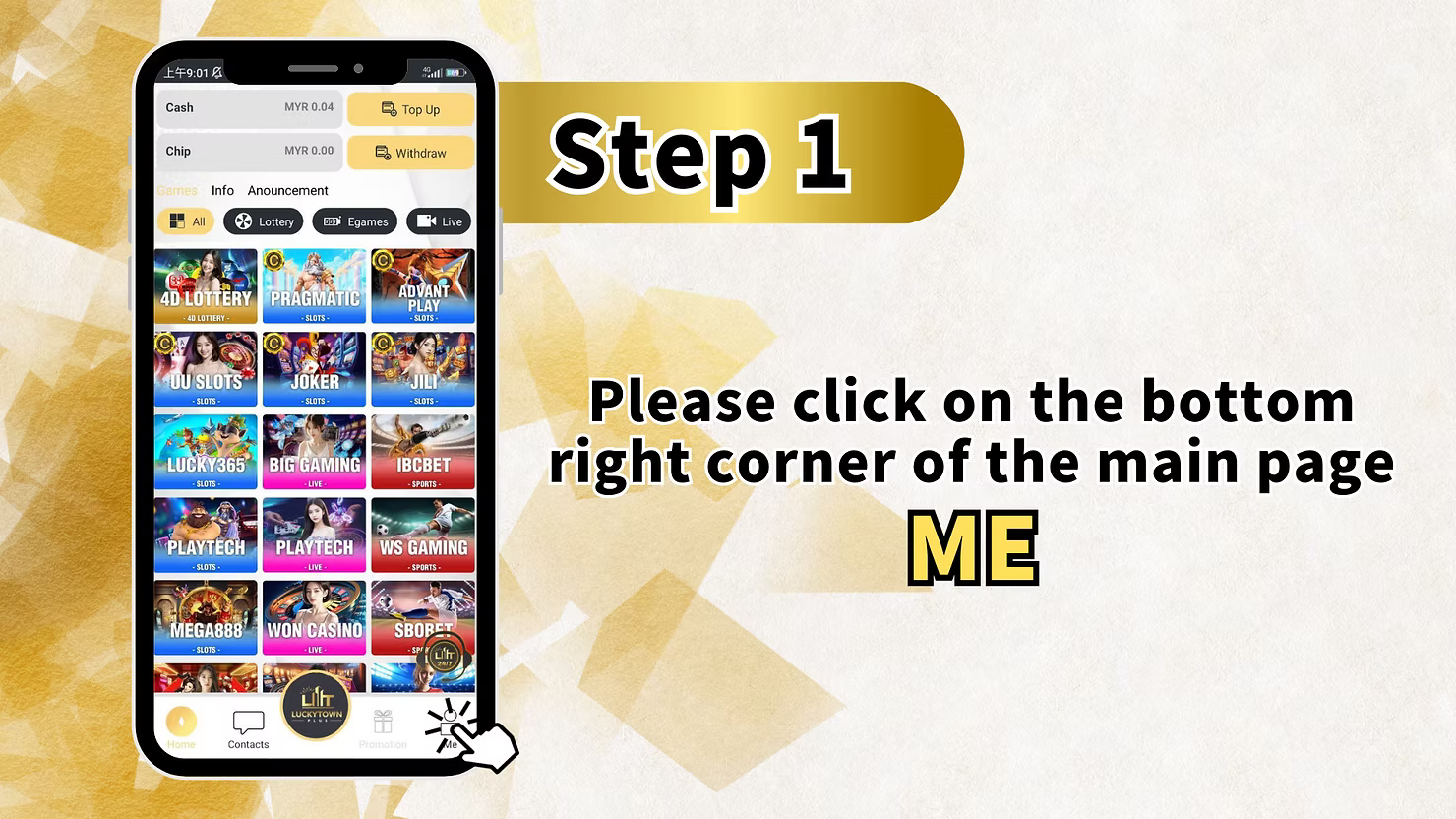
Step 1: Open the App and Tap Me
Launch the LUCKYTOWN PLUS app on your mobile device. On the main home page, locate the bottom navigation bar which contains icons for Home, Contacts, Promotion, and Me. Tap on the Me icon at the bottom right corner of the screen to access your personal account dashboard where all your account management features are available including the Currency Exchange function.
Step 2: Select Currency Exchange
Once you are on your personal account dashboard, you will see a row of quick action icons below your balance overview. The icons available include Helpdesk, Top Up / Withdraw, Transfer, Currency Exchange, Bank Account, VIP, Pull Out All Credit, and Setting. Tap on the Currency Exchange icon to navigate to the Currency Exchange page.
Step 3: Navigate to the Currency Exchange Page
On the Currency Exchange page, you will see a simple and clean exchange interface. There is a You Send Exactly field at the top where you will enter the amount you wish to exchange. The currency selector next to this field shows MYR as the default sending currency. Below that, you will see a TO section with a receiving amount field and the THB currency selector for the destination currency. The page also displays the current Exchange Rate and shows the equivalent amounts in both MYR and THB so you can review the conversion before confirming.
Step 4: Enter Exchange Amount, Check the Rate, and Click Confirm
Tap on the You Send Exactly field and enter the amount in MYR that you wish to convert to THB. Once you enter the amount, the system will automatically calculate and display the equivalent THB amount based on the current live exchange rate shown on the page. Take a moment to review the exchange rate and the converted amount to ensure you are satisfied with the transaction details. When you are ready, tap the Confirm button to complete the currency exchange instantly.
Please note that the exchange rate displayed on the page is the rate that will be applied to your transaction. The exchange rate may fluctuate based on market conditions, so always check the rate shown in the app at the time of your exchange before confirming. Once you tap Confirm, the exchange is processed immediately and cannot be reversed.
Step 5: Exchange Successful - Change Country and Play the Game
After the exchange is confirmed, the system will process the conversion instantly and your account balance will be updated to reflect the new THB amount. You will be returned to your personal account dashboard where you can see your updated balances. To start using your THB balance for gaming, tap on the country flag icon at the top of the app to switch to the Thai version of the platform and enjoy all the games available in the THB currency version.
Friendly Reminder - How to Convert THB Back to MYR and Vice Versa
Converting THB Back to MYR
If you wish to convert your THB balance back to MYR after playing in the Thai version, you must perform the currency exchange from within the Thai version of the LUCKYTOWN PLUS app. Switch your app to the Thai country version first, then navigate to the Currency Exchange section and follow the same steps to convert your THB back to MYR. You cannot convert THB to MYR from within the Malaysian version of the app.
Converting MYR to THB
To convert your MYR balance to THB, you must be using the Malaysian version of the LUCKYTOWN PLUS app. Follow the 5-step guide above to access the Currency Exchange feature and complete your MYR to THB conversion. Once the exchange is done, switch to the Thai version of the platform to use your THB balance for gaming. Always ensure you are using the correct country version of the app when performing currency exchanges to avoid any confusion.
Why Use the Currency Exchange Feature on LUCKYTOWN PLUS
Play Games in Multiple Currencies Without Leaving the App
The Currency Exchange feature on LUCKYTOWN PLUS gives players the freedom to switch between MYR and THB gaming environments without the need to make a new deposit or use an external exchange service. Everything is handled within the app at the live rate, making it one of the most convenient features available for multi-currency players on the platform.
Instant Exchange with Live Rates
All currency exchanges on LUCKYTOWN PLUS are processed instantly at the live exchange rate displayed in the app. There are no hidden fees or delays - once you tap Confirm, your balance is updated immediately and you can switch to your preferred country version and start playing right away. This ensures a seamless and uninterrupted gaming experience for all players.
Flexible Currency Management for Malaysia and Thailand Players
Whether you are a Malaysian player looking to enjoy Thai-exclusive games or a Thai player wanting to access the Malaysian version, the LUCKYTOWN PLUS currency exchange feature makes it easy to manage your balance across both platforms. The bidirectional exchange function supports both MYR to THB and THB to MYR conversions, giving every player full flexibility in how they manage their gaming funds.
Frequently Asked Questions About Currency Exchange
How do I convert MYR to THB on LUCKYTOWN PLUS
To convert MYR to THB on LUCKYTOWN PLUS, open the app and go to your personal account dashboard by tapping the Me icon. Then tap the Currency Exchange icon, enter the amount of MYR you want to convert in the You Send Exactly field, check the exchange rate and the equivalent THB amount, and tap Confirm to complete the conversion instantly.
How do I convert THB back to MYR
To convert THB back to MYR, you need to switch to the Thai version of the LUCKYTOWN PLUS app first. Once in the Thai version, navigate to the Currency Exchange section and follow the same steps to convert your THB balance back to MYR. The conversion from THB to MYR must be performed from within the Thai country version of the app.
Is the currency exchange instant on LUCKYTOWN PLUS
Yes, all currency exchanges on LUCKYTOWN PLUS are processed instantly. Once you enter your amount, review the live exchange rate, and tap Confirm, your account balance is updated immediately. You do not need to wait for any processing time before you can use your converted balance for gaming.
What exchange rate is used for the currency conversion
The exchange rate applied to your currency conversion is the live rate displayed on the Currency Exchange page in the LUCKYTOWN PLUS app at the time of your transaction. This rate is updated in real time and may vary. Always review the rate shown before tapping Confirm to ensure you are satisfied with the conversion amount.
Need Help with Currency Exchange on LUCKYTOWN PLUS
If you have any questions or encounter any difficulties while using the Currency Exchange feature on LUCKYTOWN PLUS, our customer support team is available around the clock to assist you. Tap the Contacts icon in the bottom navigation bar of the app to connect with our live support team for immediate help and guidance.
Start Exchanging Currency on LUCKYTOWN PLUS and Play Across All Versions Today
Convert your MYR to THB or THB to MYR instantly within the LUCKYTOWN PLUS app. Enjoy live exchange rates, instant processing, and seamless access to games across the Malaysian and Thai versions of the platform. Follow our 5-step guide and start playing in your preferred currency right now.
Exchange Currency Now