
Top Up at LUCKYTOWN PLUS – Complete Deposit Guide
Why Choose LUCKYTOWN PLUS for Deposits?
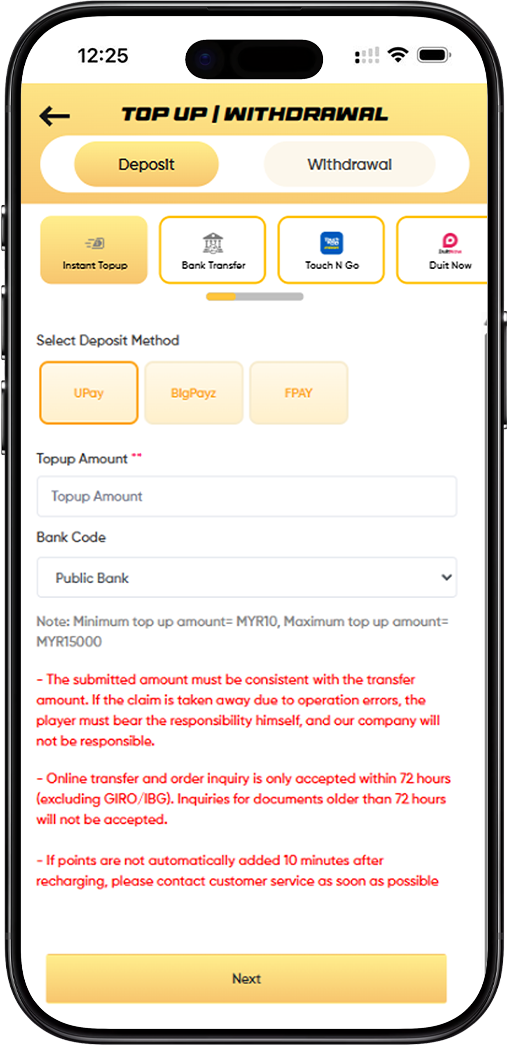
LUCKYTOWN PLUS offers five deposit channels to suit every player's preference - Instant Top Up, Bank Transfer, Touch N Go, Duit Now, and USDT TRC20. Each method has its own set of supported payment gateways, deposit limits, and important notices. This page walks you through every option in full detail so you can fund your account quickly and confidently no matter which method you choose.
How to Top Up via Instant Top Up on LUCKYTOWN PLUS - LUCKYTOWN Supports UPay, BigPayz, and FPAY
Step 1 - Select Instant Top Up and Choose Your Deposit Method
Log in to your LUCKYTOWN PLUS account and navigate to the Top Up / Withdrawal section. Select the Deposit tab and tap Instant Top Up. Choose your preferred payment gateway from the available options: UPay, BigPayz, or FPAY.
Step 2 - Enter Your Top Up Amount and Select Your Bank Code
Enter your desired top up amount in the Topup Amount field. The minimum top up amount via Instant Top Up is MYR 10 and the maximum is MYR 15,000. Select your bank from the Bank Code dropdown. Supported banks include Public Bank, May Bank, CIMB Bank, Hong Leong, RHB Bank, AmBank, Bank Simpanan Nasional, and Bank Islam.
Step 3 - Review the Important Notices and Proceed
Before tapping Next, please read the following notices carefully. The amount you submit must match the actual transfer amount exactly - any discrepancy caused by operation errors is the player's responsibility. Online transfer and order inquiries are only accepted within 72 hours, excluding GIRO and IBG transactions. Documents older than 72 hours will not be accepted. If your points are not credited within 10 minutes after topping up, contact LUCKYTOWN PLUS customer service immediately.
How to Top Up via Bank Transfer on LUCKYTOWN PLUS - LUCKYTOWN Accepts RHB Bank and Maybank
Step 1 - Select Bank Transfer and Choose Your Bank
From the Deposit tab on LUCKYTOWN PLUS, select Bank Transfer. Choose your preferred bank from the available options - currently RHB Bank and Maybank are supported for direct bank transfer deposits.
Step 2 - Enter the Transfer Amount
Enter your top up amount in MYR. The minimum deposit via Bank Transfer is MYR 20 and the maximum is MYR 20,000. Remaining top up times are unlimited for this method. Tap Next to proceed to the transfer details screen.
Step 3 - Complete the Transfer and Follow All Required Guidelines
When making the bank transfer, you must specify LT- followed by your username on the transfer slip. For example, if your ID is lucky town and your referrer is LTluckytown, include these details clearly in the remarks. Always verify the destination bank account number directly with your bank before transferring as LUCKYTOWN PLUS may update bank accounts periodically - the platform is not responsible for losses due to transfers made to outdated accounts. Ensure your withdrawal account holder name matches your top up account holder name. Avoid including sensitive keywords in the transfer remarks such as Sales, Purchases, Rent, Loan, Currency exchange, or similar terms as these will trigger a stricter review and may result in a failed top up. If the real name and bank transfer account name submitted are inconsistent, LUCKYTOWN PLUS reserves the right to reject the application. Please also note that to participate in special events, QR transfer or ID transfer will be unavailable until turnover conditions are fulfilled.
How to Top Up via Touch N Go on LUCKYTOWN PLUS - LUCKYTOWN Accepts Major E-Wallets
Step 1 - Select Touch N Go and Choose Your E-Wallet
From the Deposit tab, select Touch N Go as your top up method. Choose UPay as your deposit method. Then select your preferred e-wallet or QR payment option from the Bank Code dropdown. Supported options include Touch N Go, Boost, GrabPay, ShopeePay, and Maybank QR.
Step 2 - Enter Your Top Up Amount and Proceed
Enter your desired top up amount. The minimum top up via Touch N Go on LUCKYTOWN PLUS is MYR 10 and the maximum is MYR 2,500. Tap Next to generate your payment QR code and complete the transaction through your chosen e-wallet app.
Step 3 - Important Notices for Touch N Go Top Up
The amount submitted must match the actual transfer amount - operation errors are the player's responsibility. QR code transfer and order inquiries are only accepted within 48 hours, and documents older than 48 hours will not be entertained. If your points are not credited within 10 minutes, contact LUCKYTOWN PLUS customer service. Do not save the QR code for future use or recharge using an old QR code during maintenance periods as all such amounts cannot be verified and will be considered lost.
How to Top Up via Duit Now on LUCKYTOWN PLUS - LUCKYTOWN Supports DuitNow QR Payments
Step 1 - Select Duit Now and Choose Your Deposit Method
From the Deposit tab on LUCKYTOWN PLUS, select Duit Now. Choose either UPay or BigPayz as your deposit method. For the Bank Code, select DuitNow from the dropdown. Additional supported options for this channel include Boost, GrabPay, ShopeePay, and Maybank QR.
Step 2 - Enter Top Up Amount and Complete Payment
Enter your top up amount - the minimum is MYR 10 and the maximum is MYR 2,500 via Duit Now. Tap Next to proceed and complete the DuitNow payment using your preferred banking or e-wallet app.
Step 3 - Important Notices for Duit Now Top Up
The submitted amount must be consistent with the transfer amount. QR code transfer and order inquiries are accepted within 48 hours only - documents older than 48 hours will not be accepted. If points are not credited within 10 minutes, contact LUCKYTOWN PLUS customer service promptly. Never save the QR code to recharge at a later time or during maintenance periods as these transactions cannot be verified.
How to Top Up via USDT TRC20 on LUCKYTOWN PLUS - LUCKYTOWN Accepts Crypto Deposits
Step 1 - Select USDT TRC20 and Choose Your Crypto Exchange
From the Deposit tab on LUCKYTOWN PLUS, select USDT TRC20. Choose your crypto exchange or wallet platform from the available options: Binance, Huobi, or Others. The token type is USDT and the network is TRC20. The current exchange rate will be displayed on screen - for example, Rate: 4.12.
Step 2 - Enter Your USDT Top Up Amount
Enter the amount you wish to deposit in USDT in the Top Up Amount field. An estimated MYR equivalent will be automatically calculated and displayed in the Estimated Amount field based on the current rate shown on the platform. Tap Next to proceed to the USDT wallet address screen and complete your transfer.
Step 3 - Important Notices for USDT TRC20 Top Up
USDT top ups on LUCKYTOWN PLUS are processed on a first-come, first-served basis. Only the first customer to submit an order for a given transfer will be accepted - later submissions for the same transfer will be considered invalid. If a transfer is completed but the top up order is not submitted within 30 minutes, it will also be considered invalid. The transaction time is based on the timestamp recorded in the platform's wallet. Always submit your top up order promptly after completing your USDT transfer. LUCKYTOWN PLUS reserves the right to make changes to this policy without prior notice.
Top Up Deposit Limits Summary for LUCKYTOWN PLUS
Quick Reference for All Deposit Methods
Instant Top Up: Minimum MYR 10 - Maximum MYR 15,000. Bank Transfer: Minimum MYR 20 - Maximum MYR 20,000, Remaining times unlimited. Touch N Go: Minimum MYR 10 - Maximum MYR 2,500. Duit Now: Minimum MYR 10 - Maximum MYR 2,500. USDT TRC20: Amount in USDT based on live exchange rate displayed on the platform.
Frequently Asked Questions About LUCKYTOWN PLUS Top Up
What Should I Do If My Top Up Points Are Not Credited?
If your LUCKYTOWN PLUS balance is not updated within 10 minutes of completing your deposit, contact the customer support team immediately through the in-app Helpdesk or live chat. Have your transfer receipt ready to assist with the verification process.
Why Was My Top Up Application Rejected?
Common reasons for top up rejections on LUCKYTOWN PLUS include a mismatch between your real name and your bank transfer account name, inclusion of restricted keywords in your transfer remarks, or submitting an amount that does not match the actual transfer. Always follow the guidelines on this page carefully to ensure successful processing.
Can I Use Multiple Deposit Methods on LUCKYTOWN PLUS?
Yes. LUCKYTOWN PLUS allows members to use any of the five available deposit methods depending on their preference and convenience. You can switch between Instant Top Up, Bank Transfer, Touch N Go, Duit Now, and USDT TRC20 at any time from the Top Up section of your account.
Ready to Top Up? Fund Your LUCKYTOWN PLUS Account and Start Playing Now
Choose your preferred deposit method and add funds to your LUCKYTOWN PLUS account in minutes. Whether you prefer instant e-wallet payments, direct bank transfers, or USDT crypto deposits - LUCKYTOWN PLUS has a top up option built for you. Log in now to get started, or sign up with your Malaysia phone number if you are not yet a member.
Join LUCKYTOWN PLUS Now