
MEGA888 Game at LUCKYTOWN PLUS - Complete Guide
Why Play MEGA888 at LUCKYTOWN PLUS?



MEGA888 is one of the most recognized and widely played online slot platforms in Malaysia and Southeast Asia, offering hundreds of slot titles, arcade games, table games, and jackpot opportunities.
Through LUCKYTOWN PLUS, you can access MEGA888 without creating a separate external account. Your MEGA888 username and password are generated for you inside the platform, and you can follow the guide below to download, install, transfer funds, and start playing in just a few minutes.
LUCKYTOWN PLUS MEGA888 Download and Login - Full 7-Step Guide for LUCKYTOWN Members
Step 1: Navigate to Slot and select MEGA888
Open the LUCKYTOWN PLUS app, log in, tap the Slot tab from the main category bar, then scroll the slot-provider listing until you find MEGA888 and open its game page.
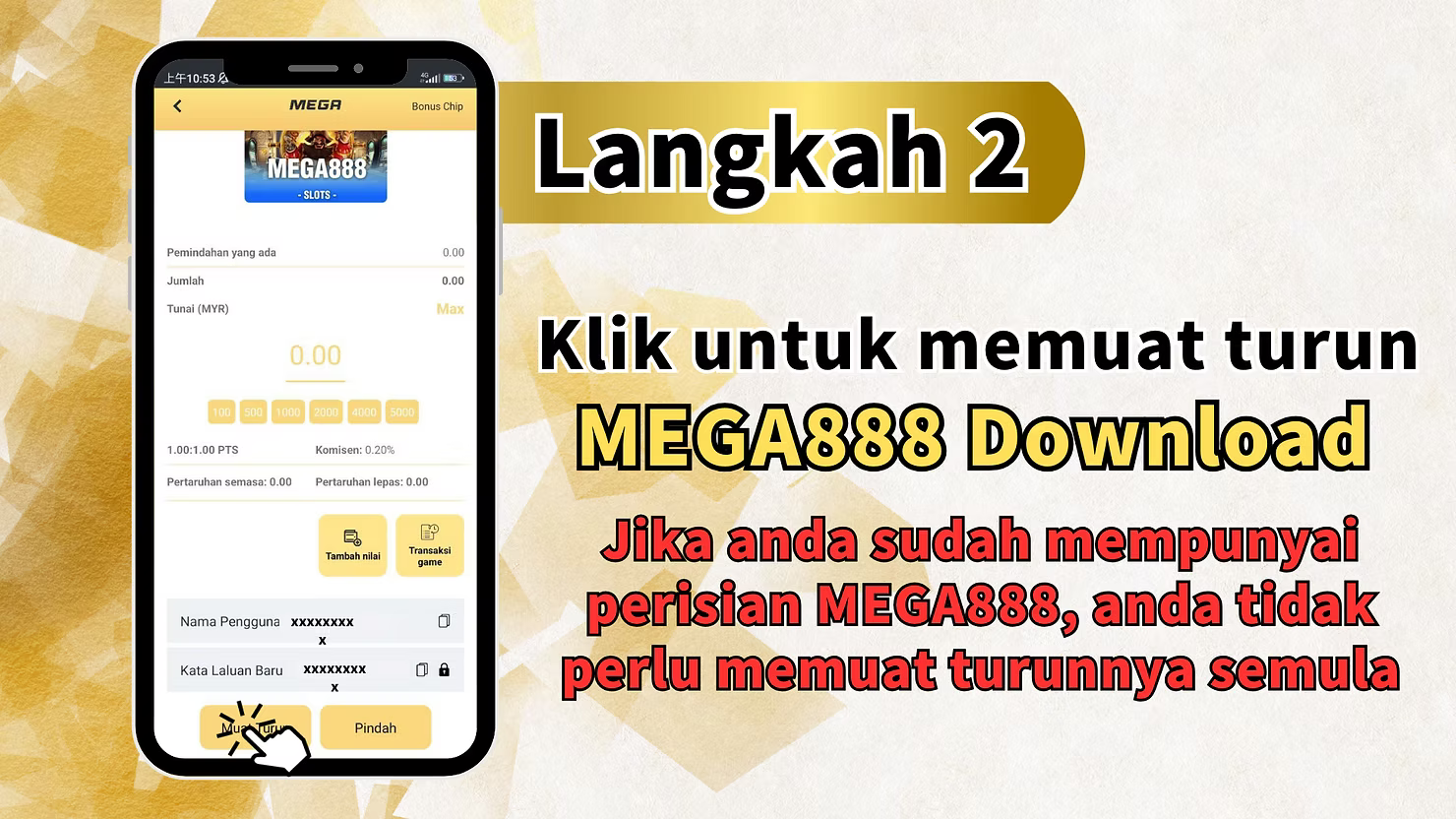
Step 2: Tap Download to get the MEGA888 app
On the MEGA888 page, review the game-account details shown there, including balances and the generated account information area. Tap Muat Turun to go to the official MEGA888 download page. If MEGA888 is already installed on your device, you can skip the fresh download and move to the later steps.
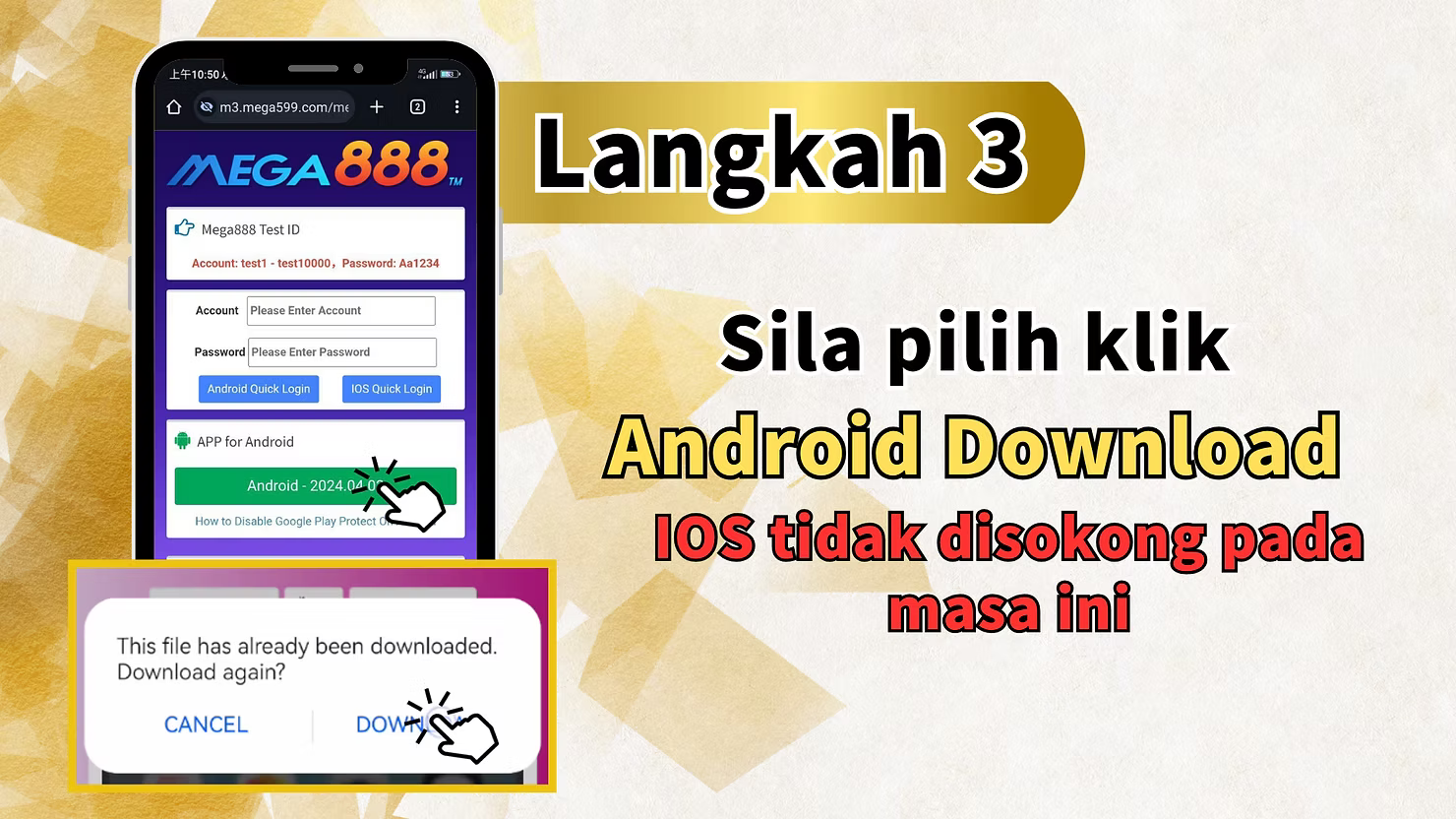
Step 3: Select Android Download
On the download page, choose the Android download option to get the MEGA888 APK file. If your browser asks whether you want to download the file again, confirm it if you want a new APK copy. The workbook notes that this direct method is for Android only.
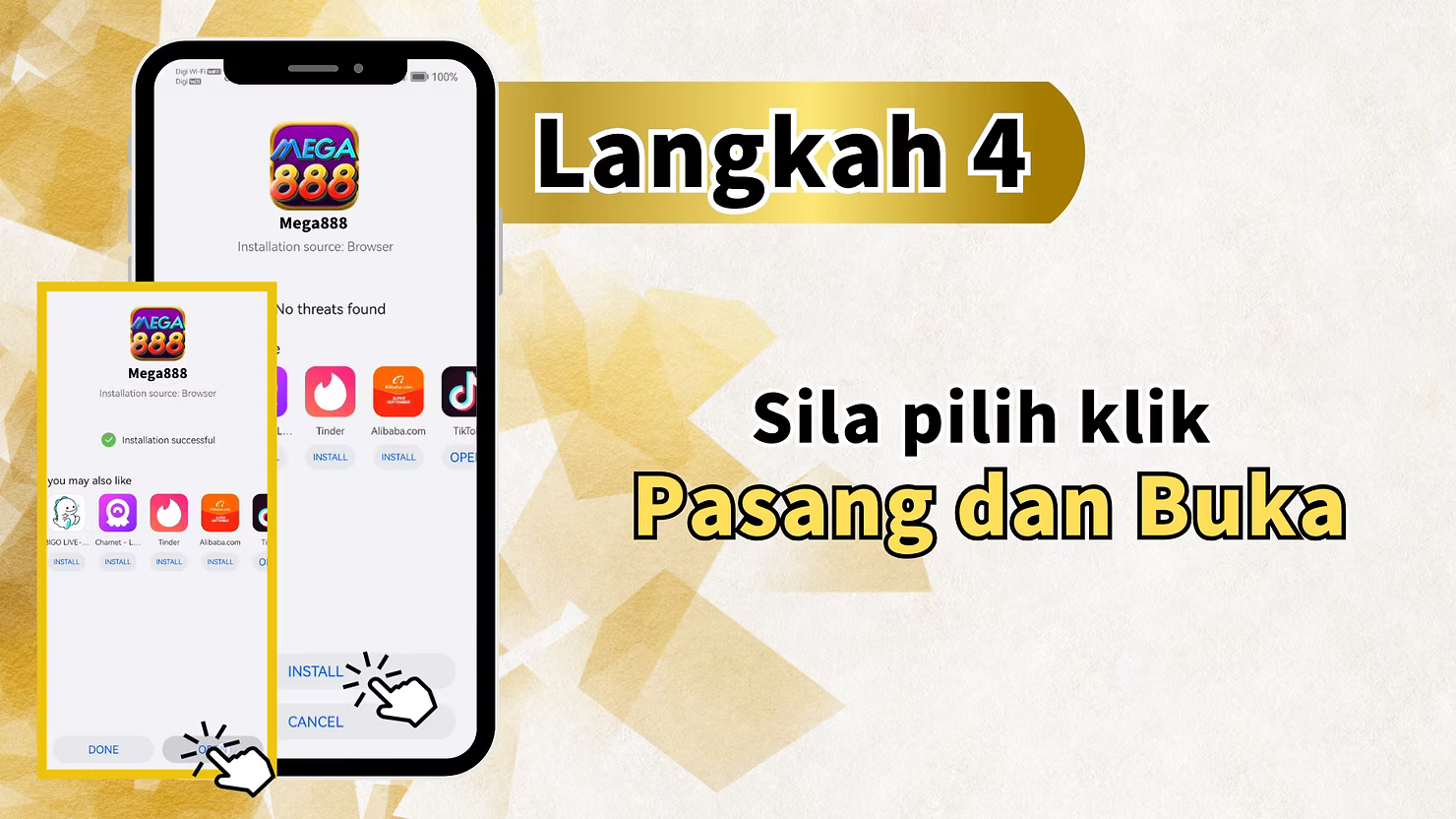
Step 4: Install the MEGA888 app and open it
After the APK finishes downloading, open it from your downloads folder or notification bar, tap Install, wait for the installation to finish, and then tap Open if you want to launch the app immediately.
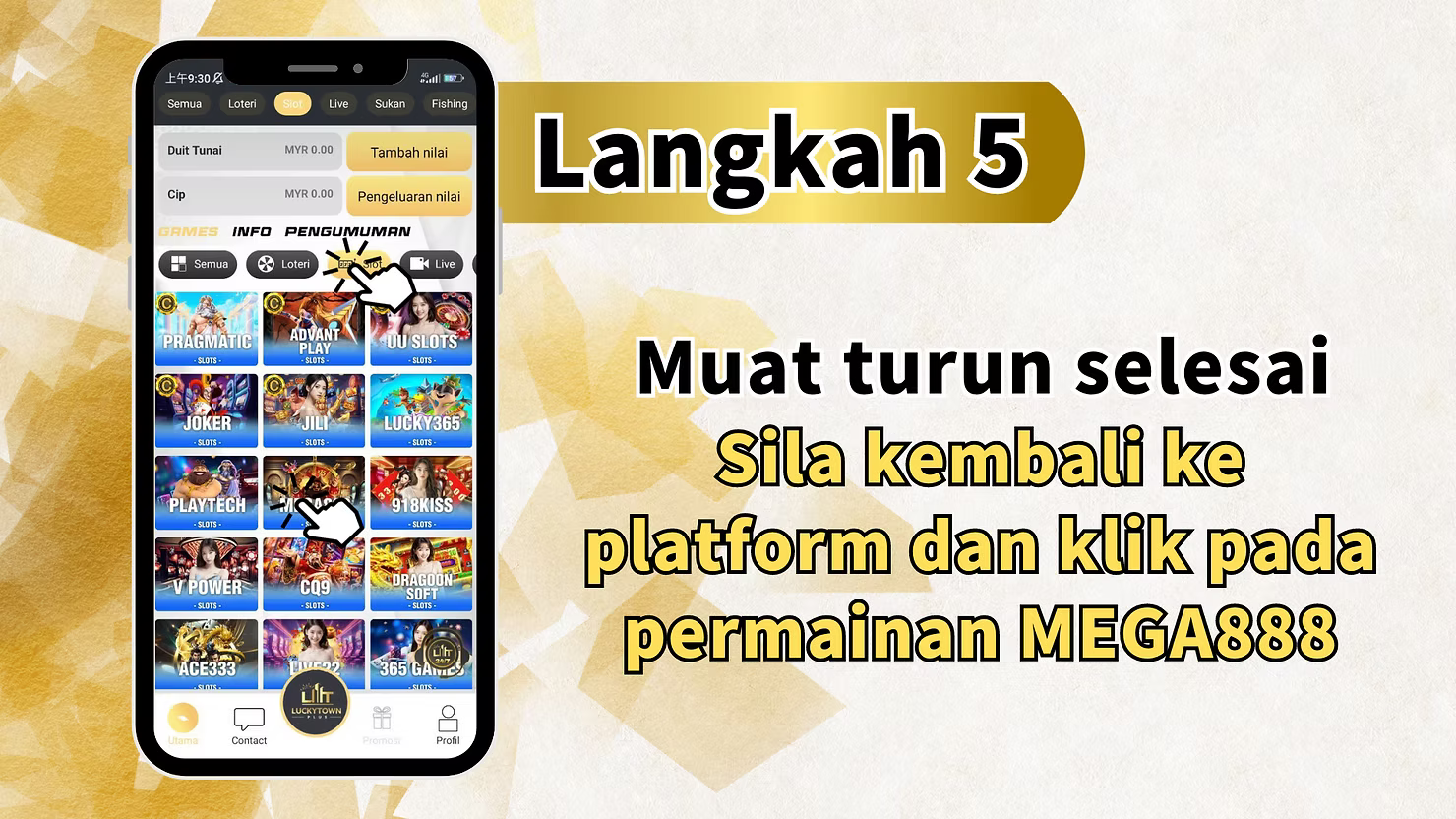
Step 5: Return to LUCKYTOWN PLUS and click the MEGA888 game again
After installation, return to the LUCKYTOWN PLUS app, go back to the Slot section, and enter the MEGA888 game page again so you can continue with credentials and balance setup.
Step 6: Copy your MEGA888 account and password, then transfer funds
Scroll to the Username and New Password fields on the MEGA888 page inside LUCKYTOWN PLUS. Copy both values using the provided copy icons, then tap Pindah to move your chosen balance from LUCKYTOWN PLUS into the MEGA888 game wallet.
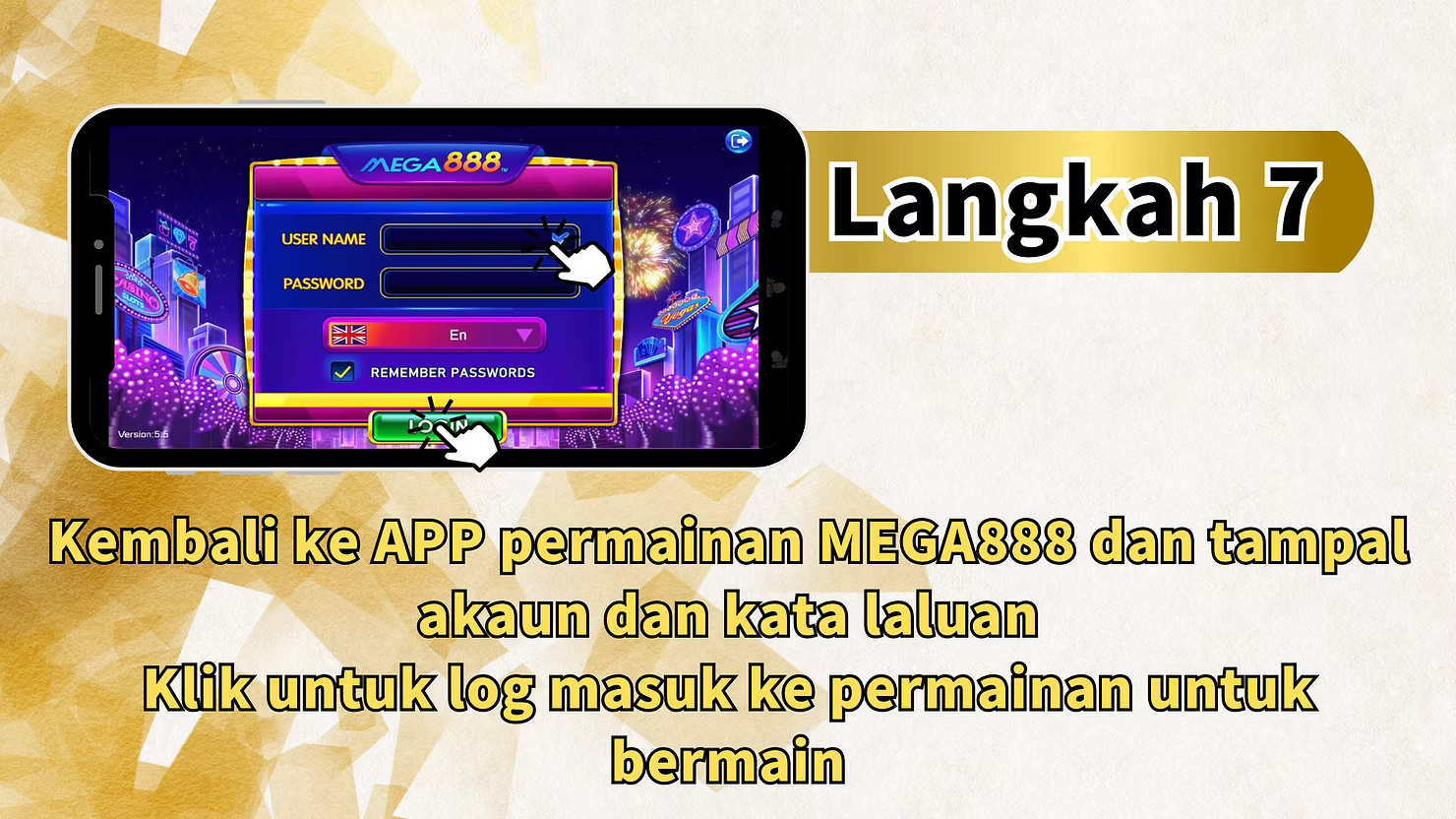
Step 7: Open the MEGA888 app, paste your credentials, and log in to play
Open the installed MEGA888 app, paste the copied username and password into the login screen, make sure the credentials are saved if needed, and tap Login. After successful login, you can enter the game lobby and play using the balance you transferred from LUCKYTOWN PLUS.
Important Information About Playing MEGA888 Through LUCKYTOWN PLUS
Android only - iOS is not currently supported
MEGA888 through this direct LUCKYTOWN PLUS flow currently supports Android devices only. iPhone and iPad users should contact support for other available options.
Your MEGA888 credentials are found inside LUCKYTOWN PLUS
LUCKYTOWN PLUS automatically generates a dedicated MEGA888 username and password for your account and displays them directly on the game page for quick copying.
Manual fund transfer is required before playing
Unlike some other integrated games, MEGA888 requires you to tap Pindah or Transfer before opening the app so the balance is available inside the MEGA888 wallet.
No need to re-download if MEGA888 is already installed
If the app is already on your Android device, return to the MEGA888 page, copy the credentials, transfer funds, and log in through the installed app without downloading again.
Why Play MEGA888 Through LUCKYTOWN PLUS
One platform for all your favorite games
LUCKYTOWN PLUS lets you manage MEGA888 and other game providers under one main account, so you do not need to juggle separate registrations and balances.
Auto-generated credentials for hassle-free access
The platform creates and stores your MEGA888 credentials for you, making login setup faster and reducing the need for separate account creation.
Access hundreds of slot games and more
MEGA888 offers a large catalog of slot, fishing, arcade, and table games, and LUCKYTOWN PLUS gives you a direct path into that catalog using your existing balance.
Frequently Asked Questions About MEGA888 on LUCKYTOWN PLUS
Can I play MEGA888 on iPhone through LUCKYTOWN PLUS?
Not through this current workbook flow. The direct download and launch method is currently described for Android devices only.
Where can I find my MEGA888 username and password?
They appear on the MEGA888 game page inside the LUCKYTOWN PLUS app. Use the copy icons next to the Username and New Password fields.
Do I need to transfer funds before playing MEGA888?
Yes. You need to tap Pindah or Transfer on the MEGA888 page before logging in to ensure the game wallet has the balance you want to use.
What should I do if I cannot log in to the MEGA888 app?
Check that you copied the exact username and password shown in LUCKYTOWN PLUS, confirm there are no extra spaces, and verify that the latest generated password is being used. If the issue continues, contact support through the in-app contact path.
Download MEGA888 Now and Start Playing on LUCKYTOWN PLUS Today
Getting started with MEGA888 through LUCKYTOWN PLUS is straightforward. Download the app, copy your generated credentials, transfer your funds, and log in to start playing the full MEGA888 catalog through your existing platform account.
Play MEGA888 Now