
Bank Transfer Top Up at LUCKYTOWN PLUS - Complete Guide
Why Choose Bank Transfer for Top Up at LUCKYTOWN PLUS?
Supported Banks & Deposit Limits
LUCKYTOWN PLUS supports bank transfer top-ups from all major Malaysian banks including Maybank, Public Bank, CIMB Bank, Hong Leong Bank, and more. The minimum deposit amount per transaction is MYR20, and the maximum is MYR20,000. There is no limit on the number of top-up transactions, so you can recharge your LUCKYTOWN PLUS wallet as many times as needed. All deposits are processed by the LUCKYTOWN PLUS finance department within 10 minutes of a successful receipt submission.
Important: Your Bank Account Name Must Match Your Verified Real Name
How to Top Up LUCKYTOWN PLUS via Bank Transfer - 9 Steps





Step 1: Tap "Me" in the Bottom Right Corner of the Home Screen
Open the LUCKYTOWN PLUS app and log in to your account. From the Home screen, locate the navigation bar at the bottom of the screen. Tap the "Me" icon in the bottom right corner to access your personal account dashboard where all wallet and account management options are available.
Step 2: Tap "TopUp / Withdraw" (Deposit / Withdrawal)
On your LUCKYTOWN PLUS account dashboard, you will see a row of quick-access icons. Tap the "TopUp / Withdraw" icon, also labelled as Deposit / Withdrawal, to open the Top Up and Withdraw screen. This is the central hub for managing all deposits and withdrawals on your LUCKYTOWN PLUS account.
Step 3: Select "Top Up" and Choose "Bank Transfer"
On the Top Up / Withdraw screen, make sure the "Top Up" tab is selected at the top. You will see several top-up method options displayed as icons, including Instant Top Up, Bank Transfer, Touch N Go, and Duit Now. Tap the "Bank Transfer" icon to proceed with a manual bank transfer deposit. The screen will display the available deposit banks, the amount field, and applicable deposit limits and notices.
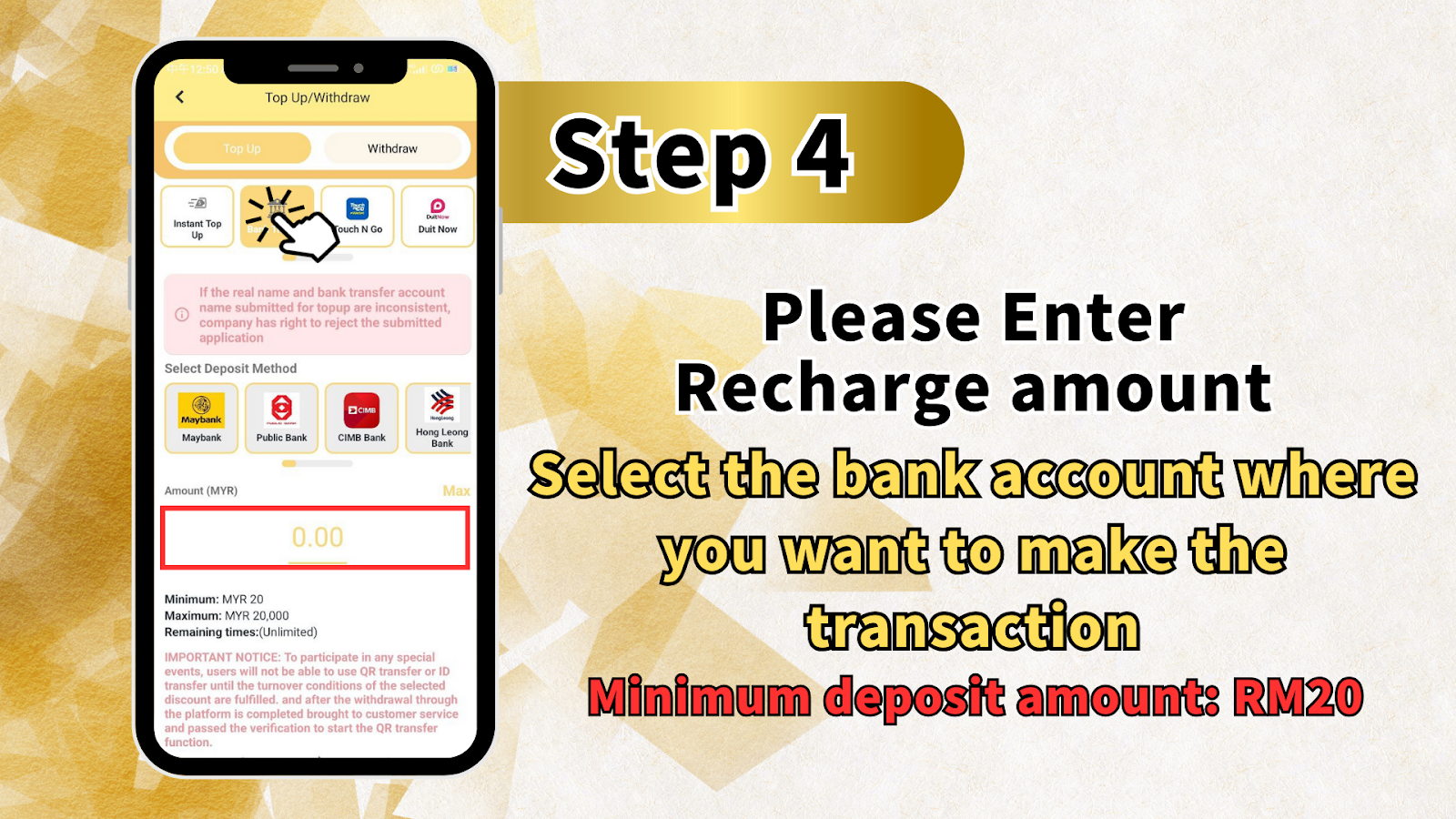
Step 4: Select Your Bank and Enter the Deposit Amount
Under the "Select Deposit Method" section, choose the bank you will be transferring from, options include Maybank, Public Bank, CIMB Bank, Hong Leong Bank, and other supported banks. Then tap the Amount (MYR) field and enter the exact amount you wish to deposit into your LUCKYTOWN PLUS wallet. The minimum deposit is MYR20 and the maximum is MYR20,000 per transaction. Remaining top-up times are unlimited.
Important Notice: Fraud Prevention - Remarks Field Warning
When performing your bank transfer, please ensure that the remarks field in your banking app does not contain any of the following keywords, as these will cause your transfer to be reviewed more strictly and may result in a failed top-up: Sales / Purchases, Rent / Loan, Telecommunication station, Currency exchange, Medical supplies, Clothing supply, Electronic products, Transportation, Car parts, Motor parts, Luxury / Famous brand, Concert tickets / Coupons, Foods / Snacks / Fruits / Drinks / Books, and others. To avoid any delays, leave the remarks field blank or use only your LUCKYTOWN PLUS username as the reference.
Step 5: Review the Information and Tap "Next"
After selecting your bank and entering your deposit amount, scroll down the Top Up / Withdraw screen to review all the important notices and terms displayed on the page. Once you have read through all the information, tap the "Next" button at the bottom of the screen to proceed to the bank account details page where you will find the LUCKYTOWN PLUS receiving account number for your transfer.
Step 6: Copy the LUCKYTOWN PLUS Receiving Account Number and Transfer Funds via Your Bank App
On the next screen, you will see the LUCKYTOWN PLUS receiving bank account number and the referral name "Lucky Town Plus." Tap the copy icon next to the account number to copy it to your clipboard. Then open your personal banking app, such as Maybank2u, CIMB Clicks, PublicBank app, or Hong Leong Connect, and perform an interbank transfer to the displayed LUCKYTOWN PLUS account number for the exact amount you entered in the previous step. Do not close the LUCKYTOWN PLUS app while doing this, because you will need to return to it after the transfer is complete.
Step 7: Take a Screenshot of Your Transfer Receipt and Return to the LUCKYTOWN PLUS App
After completing your bank transfer, take a clear screenshot of the successful transaction receipt from your banking app. This receipt screenshot serves as proof of payment for your LUCKYTOWN PLUS top-up submission. Return to the LUCKYTOWN PLUS app and navigate back to the Bank Transfer top-up screen. Tap the "Please upload receipt" area and choose your preferred upload method, either "Take Picture" using your camera or "Select From Gallery" to select the saved screenshot from your phone's album.
Step 8: Upload Your Receipt and Tap "Next"
Once your receipt image has been selected and uploaded successfully, it will appear as a thumbnail in the receipt upload area on the LUCKYTOWN PLUS top-up screen. You can tap "Add More" if you need to upload additional receipt images. When you are ready, tap the yellow "Next" button to submit your top-up request. If you wish to cancel the submission, tap "Cancel" instead.
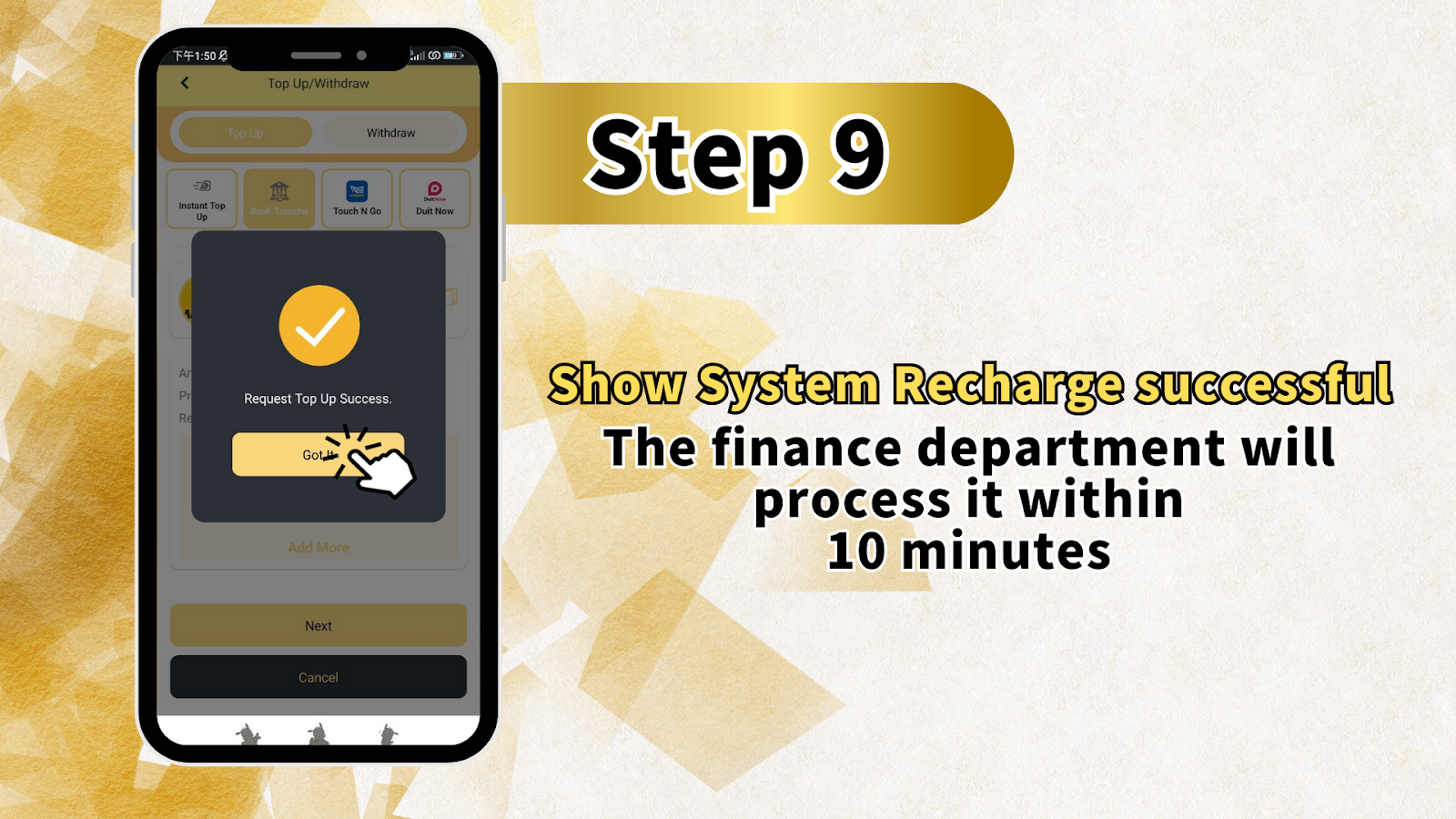
Step 9: Top-Up Request Submitted - Await Processing Within 10 Minutes
After tapping "Next" to submit your receipt, LUCKYTOWN PLUS will display a confirmation screen showing "Request Top Up Success" with a green checkmark. Tap "Got It" to dismiss the confirmation. Your top-up request has been successfully submitted and the LUCKYTOWN PLUS finance department will review and process your deposit within 10 minutes. Once approved, the credited amount will appear in your LUCKYTOWN PLUS Cash wallet and you can begin playing immediately.
Other Top-Up Methods Available on LUCKYTOWN PLUS
Instant Top Up - Fastest Deposit Method
In addition to Bank Transfer, LUCKYTOWN PLUS also offers an Instant Top Up option for the fastest possible deposit processing. Instant Top Up is ideal for players who need their wallet credited immediately without waiting for manual receipt verification. Select "Instant Top Up" from the Top Up / Withdraw screen to get started.
Touch N Go & Duit Now - E-Wallet Top Up Options
LUCKYTOWN PLUS also supports e-wallet top-ups via Touch N Go and Duit Now for members who prefer cashless payment methods. Simply select the relevant e-wallet option from the Top Up / Withdraw screen, follow the on-screen instructions, and your deposit will be processed quickly and securely.
Frequently Asked Questions - LUCKYTOWN PLUS Bank Transfer Top Up
What Is the Minimum and Maximum Deposit Amount for Bank Transfer on LUCKYTOWN PLUS?
The minimum deposit amount for a bank transfer top-up on LUCKYTOWN PLUS is MYR20 per transaction. The maximum deposit amount is MYR20,000 per transaction. There is no limit on the number of top-up transactions you can make, and your remaining top-up times are listed as Unlimited on the Top Up screen.
How Long Does a Bank Transfer Top Up Take to Be Credited on LUCKYTOWN PLUS?
After you have submitted your bank transfer receipt on LUCKYTOWN PLUS, the finance department will review and process your deposit within 10 minutes. Once approved, the credited amount will be added directly to your LUCKYTOWN PLUS Cash wallet. If your deposit has not been credited after 10 minutes, please contact the LUCKYTOWN PLUS Helpdesk or customer support team for assistance.
What Should I Do If My Top-Up Is Rejected?
If your LUCKYTOWN PLUS bank transfer top-up is rejected, the most common cause is a mismatch between the bank account holder name used for the transfer and the real name verified on your LUCKYTOWN PLUS account. Ensure that both names are exactly identical. Other reasons may include an incorrect transfer amount, a missing or unclear receipt, or a flagged remarks field in your banking app. Contact the LUCKYTOWN PLUS Helpdesk immediately for guidance on resubmitting your top-up.