
Real Name Verification at LUCKYTOWN PLUS - Complete Guide
Why Real Name Verification Is Important at LUCKYTOWN PLUS
Account Security & Withdrawal Protection
Real-name verification on LUCKYTOWN PLUS is a mandatory security measure that ensures your account is protected against unauthorized access and that all withdrawal transactions are matched to your verified identity. By verifying your real name and linking it to your registered bank account, LUCKYTOWN PLUS guarantees that only you can withdraw funds from your account, keeping your winnings safe at all times.
Required Before Your First Withdrawal
All LUCKYTOWN PLUS members must complete real-name verification before their first withdrawal request can be processed. This one-time verification step takes less than 5 minutes to submit and is reviewed by the LUCKYTOWN PLUS team within 3 working days. Once verified, your account status will be updated to "Verified" and you will have full access to all withdrawal features without restriction.
How to Complete Real-Name Verification on LUCKYTOWN PLUS - 5-Step Guide



Step 1: Tap "Me" in the Bottom Right Corner of the Home Screen
Open the LUCKYTOWN PLUS app and log in to your account. From the Home screen, look at the navigation bar at the bottom of the screen. Tap the "Me" icon located in the bottom right corner. This will take you to your personal account dashboard where all account management options are available.
Step 2: Select "Setting" from Your Account Dashboard
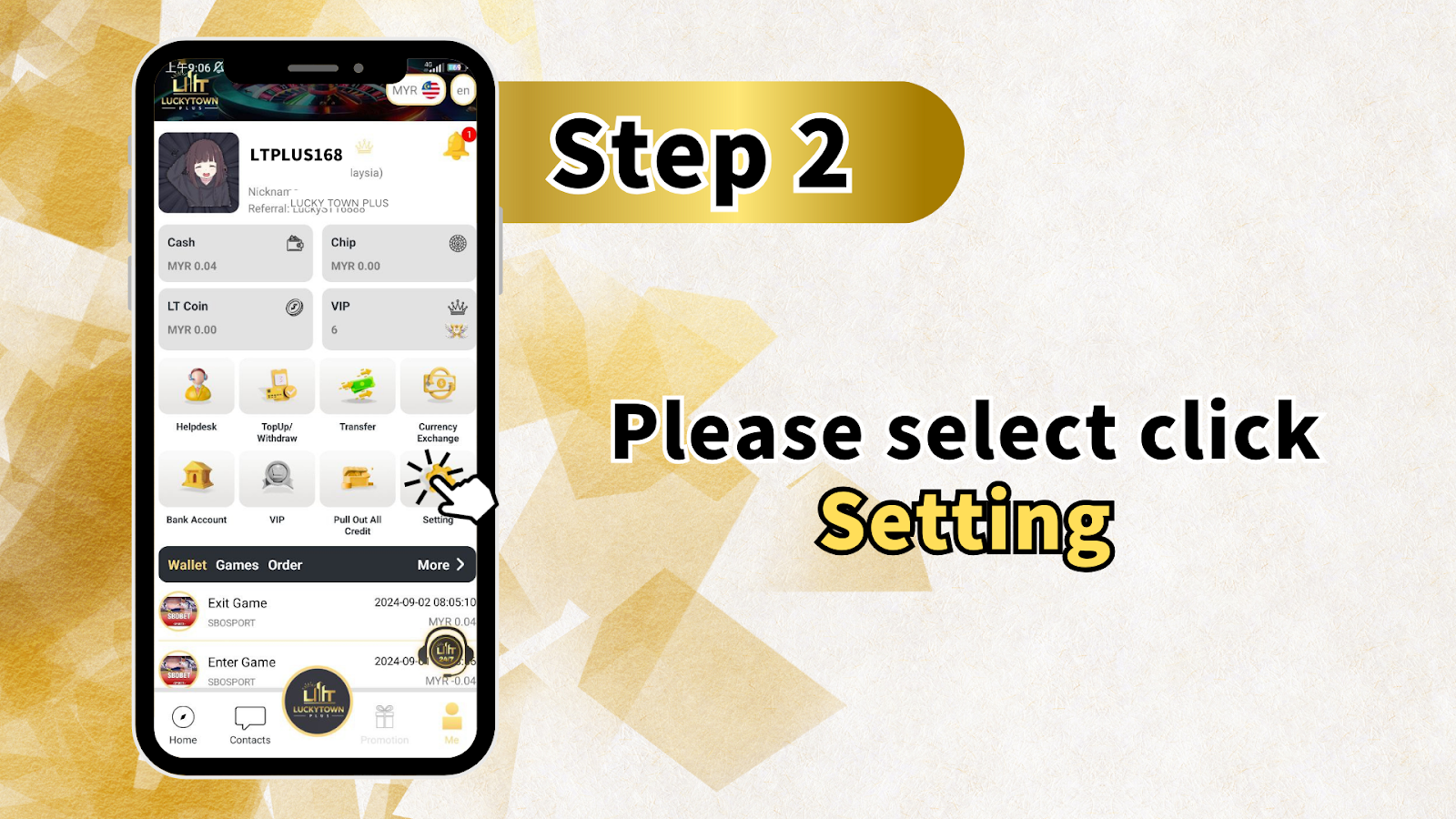
On your LUCKYTOWN PLUS account dashboard (the "Me" page), you will see a row of quick-access icons including Helpdesk, TopUp/Withdraw, Transfer, Currency Exchange, Bank Account, VIP, Pull Out All Credit, and Setting. Tap the "Setting" icon to open the full settings menu for your account.
Step 3: Tap "Real Name Verification" in the Settings Menu
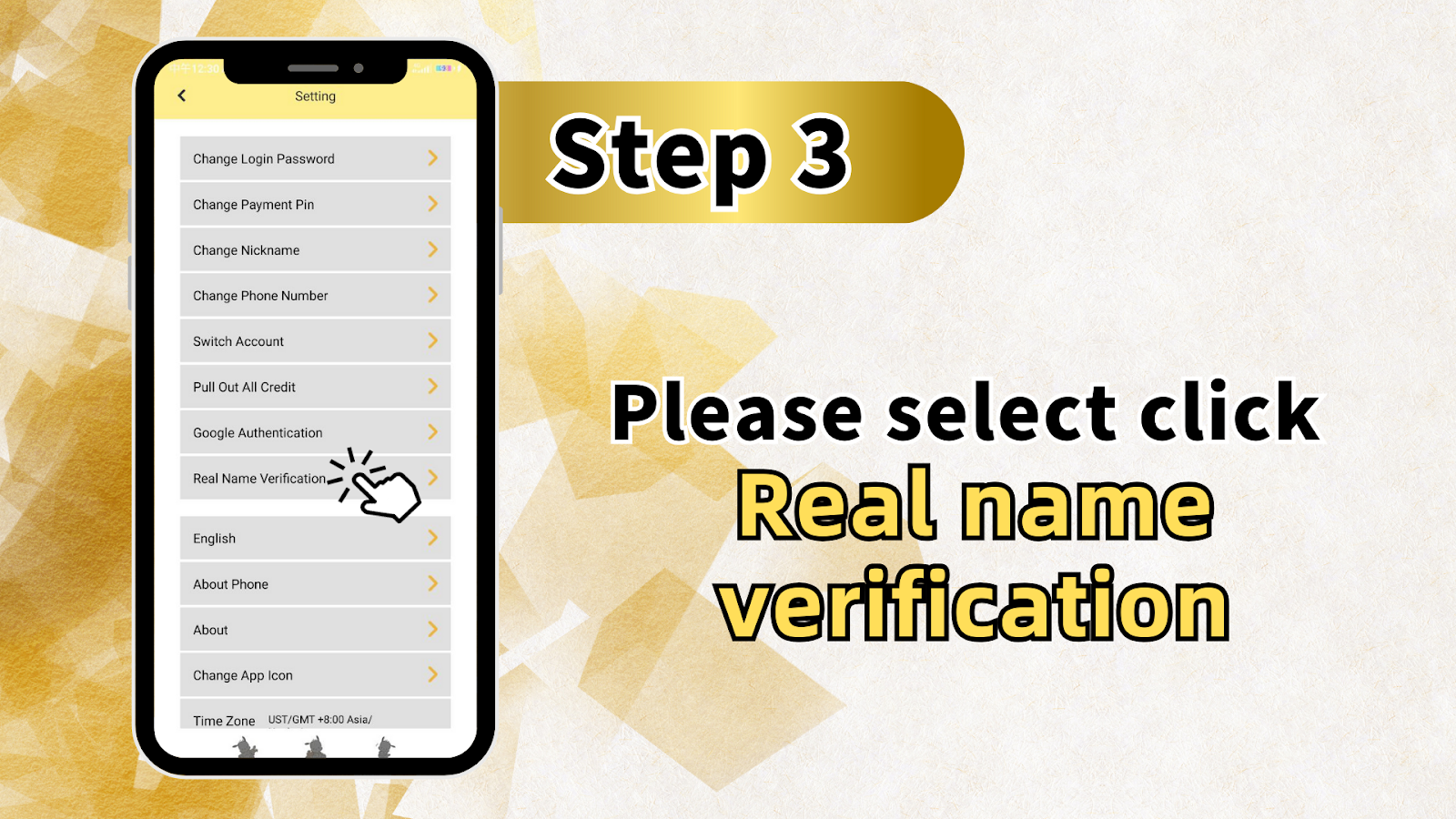
Inside the LUCKYTOWN PLUS Settings menu, you will see a list of options including Change Login Password, Change Payment Pin, Change Nickname, Change Phone Number, Switch Account, Pull Out All Credit, Google Authentication, Real Name Verification, English (language settings), About Phone, About, Change App Icon, and Time Zone. Tap on "Real Name Verification" to proceed to the verification form.
Step 4: Enter Your Account Name and Linked Bank Account
On the Real Name Verification screen, tap the "Account Name" field and enter your full real name exactly as it appears on your bank account. This name must match the name registered with your bank, and any mismatch may cause your verification to be rejected. If you have not yet added a bank account to your LUCKYTOWN PLUS profile, you will need to go to "Bank Account" in your account dashboard first, add your bank details under your real name, and then return to complete the Real Name Verification form. Once your real name is entered and your bank account is selected, tap the "Confirm" button to submit your verification request.
Important Note: Bank Account Must Be Added Before Verification
If your account name field cannot be selected or appears empty during Real Name Verification on LUCKYTOWN PLUS, it means you have not yet linked a bank account to your profile. Navigate to Me > Bank Account > Add Bank Account, enter your bank details using your real name, save the account, and then return to the Real Name Verification step to complete the process.
Step 5: Submit Your Request and Wait for Processing
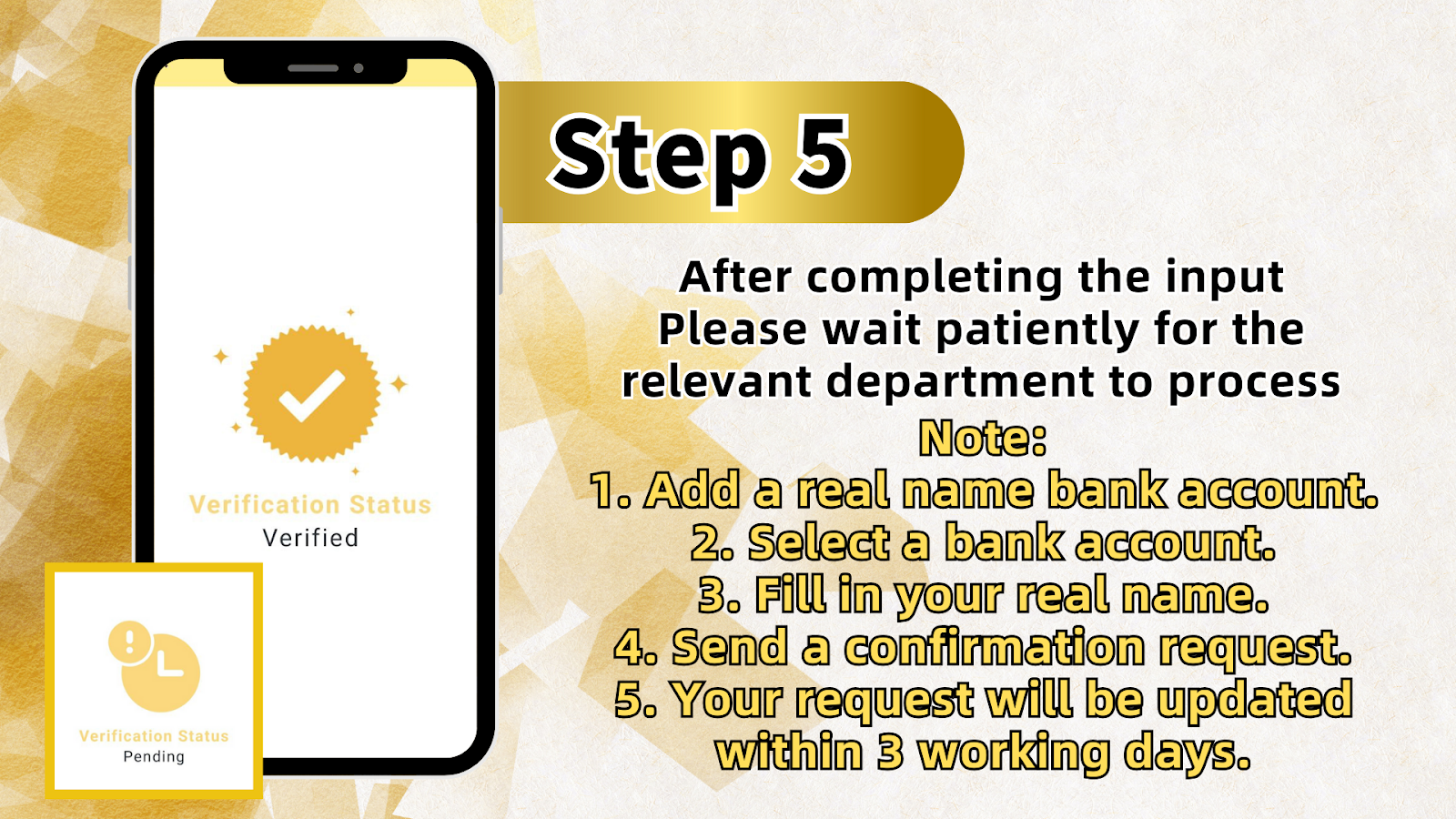
After entering your real name and confirming your linked bank account, tap "Confirm" to submit your Real Name Verification request on LUCKYTOWN PLUS. Your verification status will immediately change to "Pending" while the LUCKYTOWN PLUS team reviews your submission. Your request will be fully processed and updated within 3 working days. Once approved, your verification status will change to "Verified," confirming that your LUCKYTOWN PLUS account is fully authenticated and ready for unrestricted withdrawals.
Understanding Your LUCKYTOWN PLUS Verification Status
Pending - Your Request Is Being Reviewed
After submitting your real-name verification request, your LUCKYTOWN PLUS account will display a "Pending" verification status. This means your submission has been received and is currently under review by the LUCKYTOWN PLUS verification team. The review process takes up to 3 working days. During this period, please ensure that your submitted name exactly matches the name on your registered bank account to avoid delays or rejection.
Verified - Your Account Is Fully Authenticated
Once your real-name verification is approved by LUCKYTOWN PLUS, your account status will be updated to "Verified." This confirms that your identity has been successfully matched to your registered bank account. A "Verified" status means you have full access to all withdrawal features on LUCKYTOWN PLUS, and all future transactions will be processed smoothly under your verified real name.
Frequently Asked Questions - LUCKYTOWN PLUS Real-Name Verification
Why Does My Real Name Need to Match My Bank Account?
LUCKYTOWN PLUS requires your real name to exactly match the name registered with your bank account to prevent fraud and ensure that withdrawal funds are delivered only to the correct account holder. Any discrepancy between your submitted name and your bank account name may result in your verification request being rejected or delayed. Always use your full legal name as it appears on your bank records.
How Long Does Real-Name Verification Take on LUCKYTOWN PLUS?
After submitting your Real Name Verification request on LUCKYTOWN PLUS, the review and processing time is within 3 working days. You can check your verification status at any time by going to Me > Setting > Real Name Verification and viewing the current status, either Pending or Verified. If your status has not been updated after 3 working days, please contact the LUCKYTOWN PLUS customer support team for assistance.
What Should I Do If I Haven't Added a Bank Account Yet?
If you have not yet added a bank account to your LUCKYTOWN PLUS profile, you will not be able to complete Real Name Verification until a bank account is linked. Go to your "Me" dashboard and tap "Bank Account" to add your bank details. Make sure the account holder name on the bank account matches your real name exactly. Once your bank account is saved, return to Setting > Real Name Verification to complete your submission.
Can I Change My Verified Real Name After Submission?
Once your real-name verification has been approved on LUCKYTOWN PLUS, the verified name is permanently linked to your account and cannot be changed independently. If you need to update your verified real name due to a legal name change or an error in your submission, please contact the LUCKYTOWN PLUS customer support team directly through the Helpdesk or the Contacts section in the app for assistance.
Verify Your Identity Today - Complete Real-Name Verification on LUCKYTOWN PLUS in Under 5 Minutes
Protect your LUCKYTOWN PLUS account and unlock full withdrawal access by completing your real-name verification now. Simply go to Me > Setting > Real Name Verification, enter your bank account name, and submit your request. Your verification will be reviewed and updated within 3 working days. Log in to your account now to get started.
Log In & Verify Your Account Now